Most teams do not think about their Salesforce org until something breaks. A report stops matching reality, a rep asks why three fields say the same thing, or a new CRO asks for a number nobody can produce cleanly. That is usually the moment someone says the words "we should probably run a Salesforce audit."
The problem is that most audits stop at cleanup. They flag duplicate fields, inactive users, and unused automations, hand over a spreadsheet, and call it done. That is a checklist, not a health check. A real Salesforce health check starts with an honest assessment of where the org actually stands, then tells you whether it can support where the business is headed next, not just where it has been.
This article breaks down what a complete audit actually covers, when to run one, and how to turn the findings into something the business can act on.
In this article, you will find:
What actually triggers the need for a health check, beyond a calendar reminder
The four areas a real audit has to cover, and what each one catches
Why findings without prioritization are close to useless
How often to run a health check based on org complexity
What to do with the results once you have them
When a Salesforce Health Check Actually Pays Off
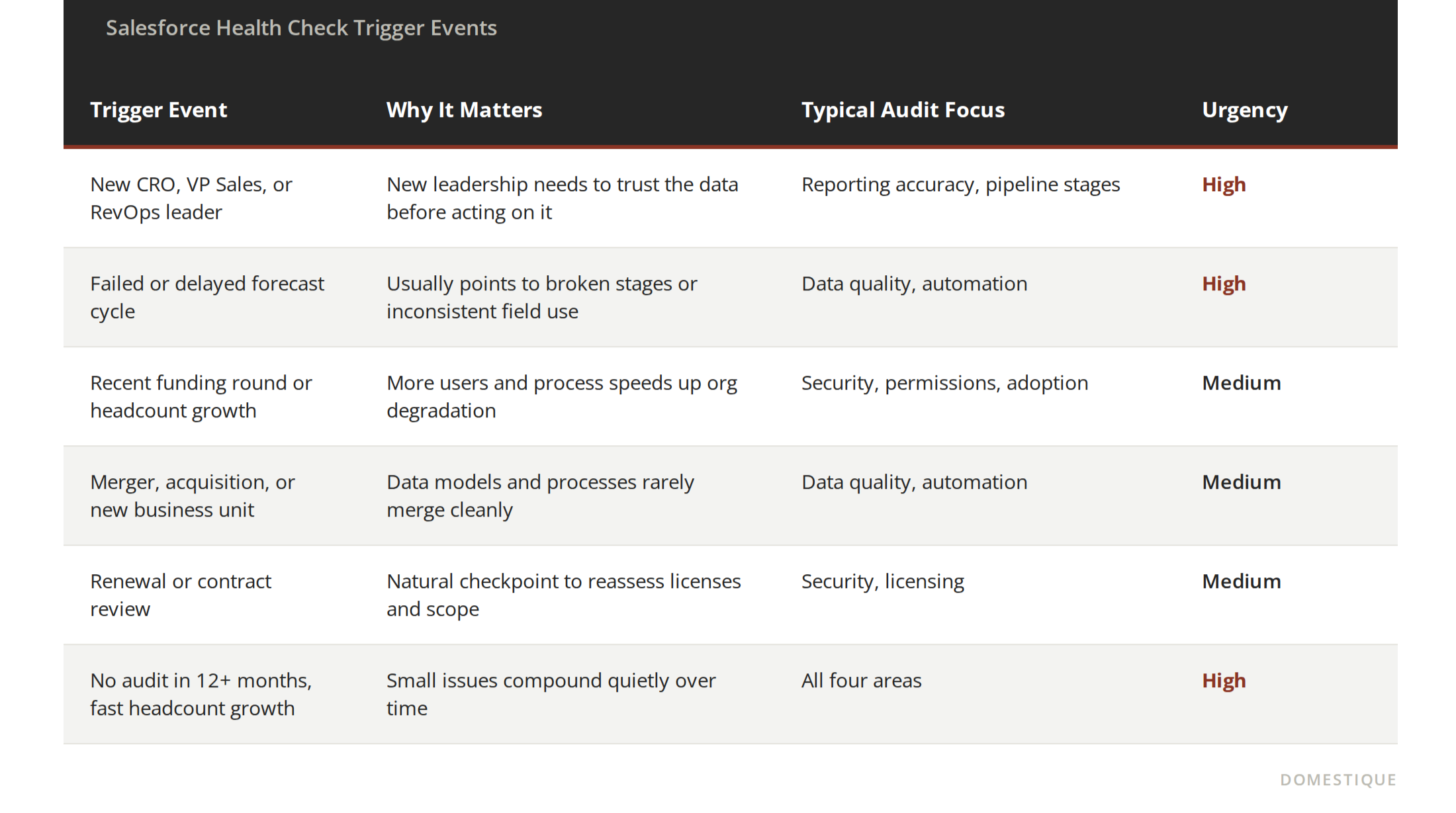
If any of these have happened in the last two quarters, that is a stronger reason to run a health check than the calendar is.
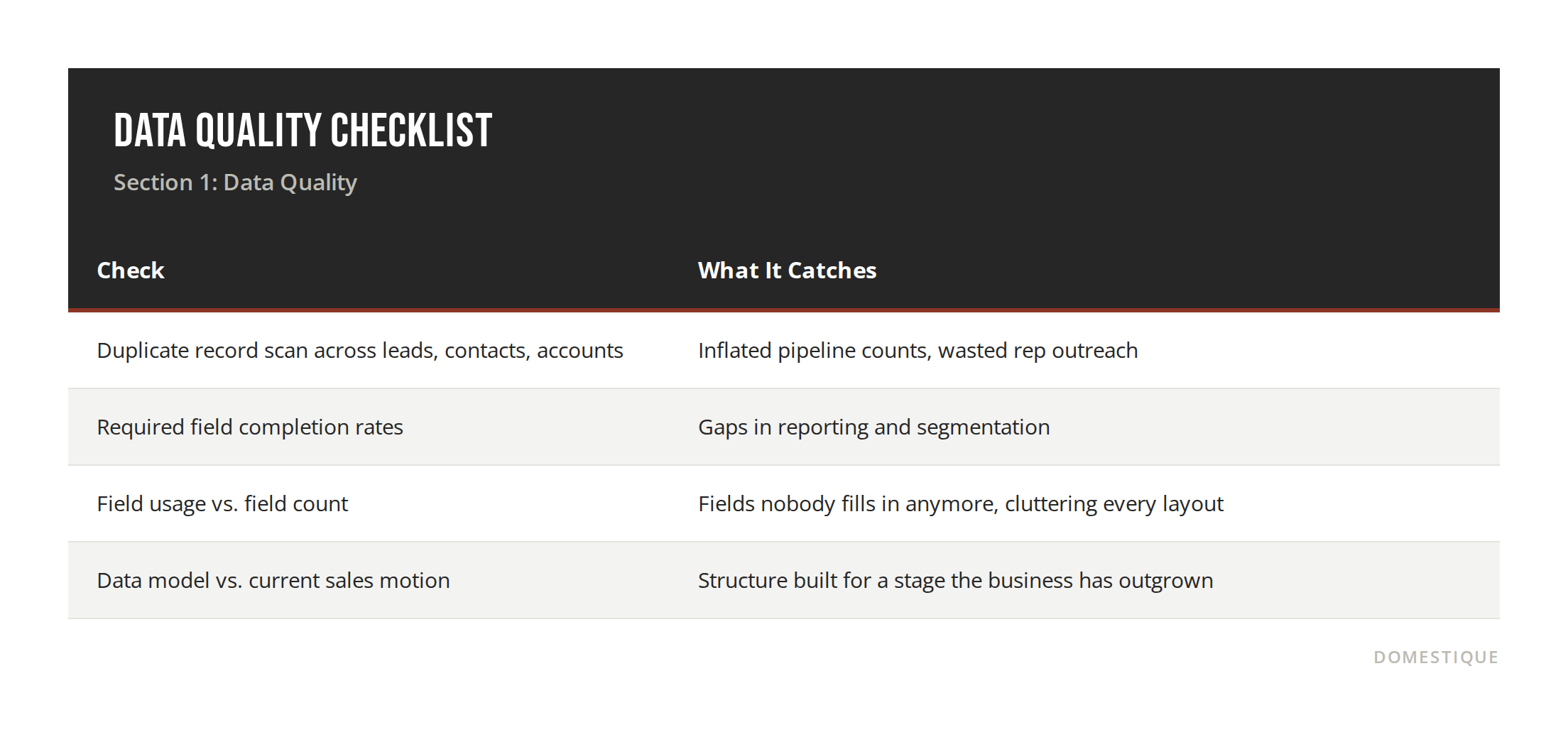
Section 1: Data Quality Is the Most Visible Problem, Not the Biggest One
Duplicate records, missing fields, and stale contact data are usually the first things anyone notices, and they are also the easiest to fix. A quick dedupe project or a cleanup rule can knock out a large share of visible clutter in a matter of weeks.
The harder question is whether the data model still reflects how the business actually sells today. A field structure built for a five-person sales team rarely holds up once the motion shifts to multiple segments, a partner channel, or a self-serve tier. An audit needs to look past the mess on the surface and ask whether the underlying structure still makes sense.
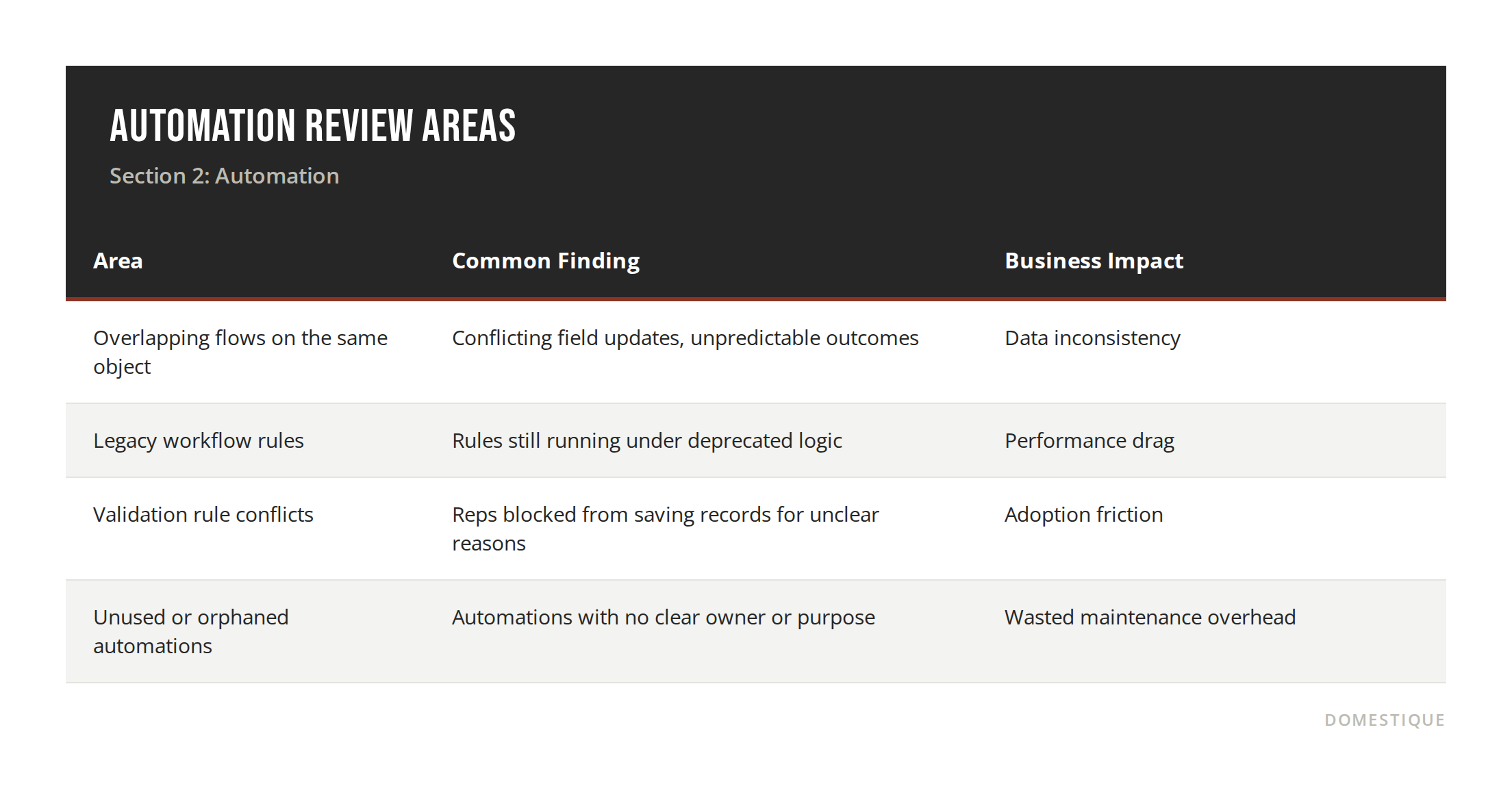
Section 2: Automation Piles Up Faster Than Anyone Notices
Flows, workflow rules, and validation rules accumulate over years, usually built by different admins solving different problems at different times. Individually, each one made sense. Together, they often overlap, contradict each other, or fire in an order nobody fully understands anymore.
An audit should map what is actually firing in the org today, not just what technically exists in setup. The distinction matters because plenty of automations are still active but functionally dead weight, quietly slowing the org down every time a record saves.
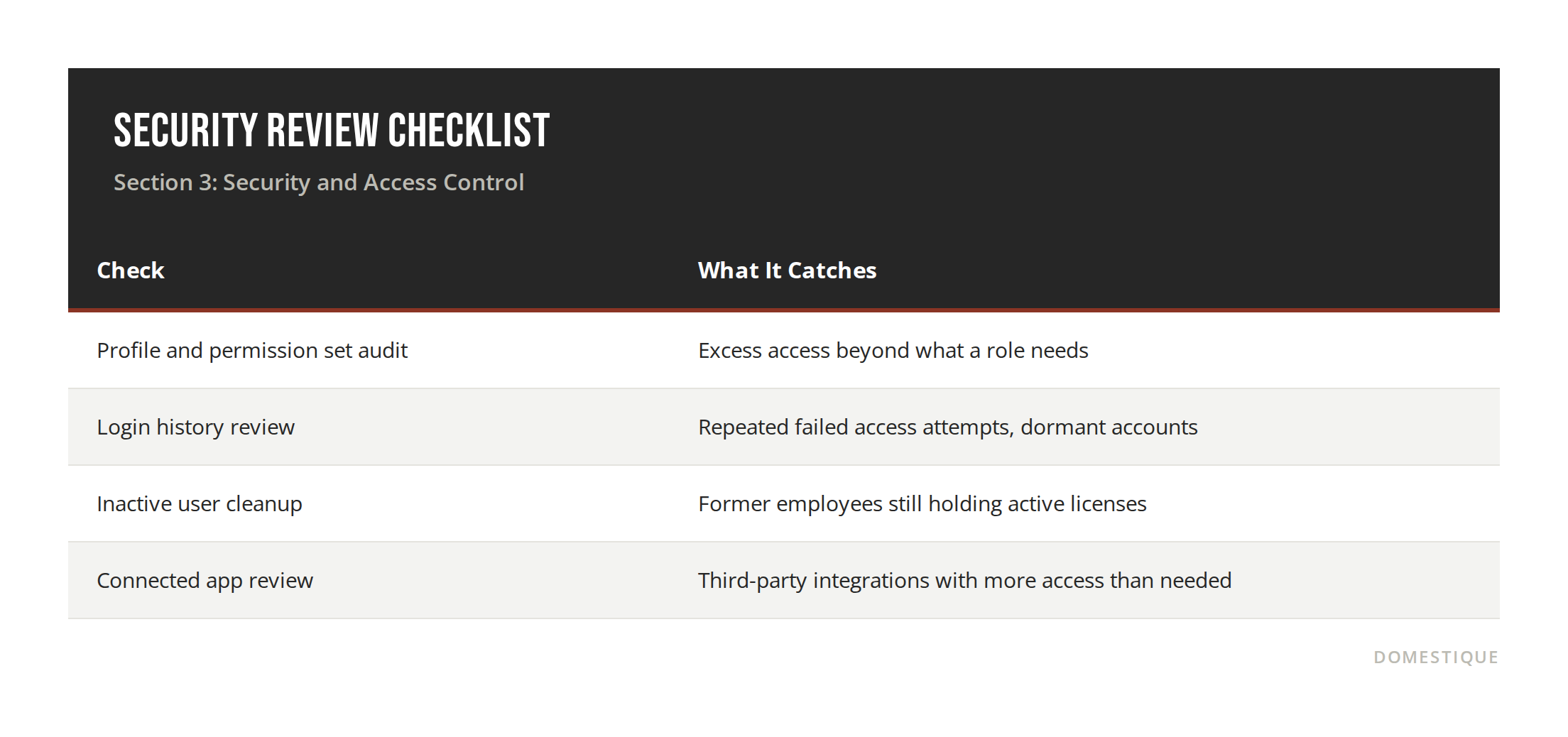
Section 3: Security and Access Control Gets Sloppy as Orgs Scale
Permission sprawl is one of the most common findings in fast-growing orgs. New roles get added, old ones never get cleaned up, and admins default to broader access just to avoid support tickets. The result is a permission structure that is both a compliance risk and a drag on every future change, since broader access means more testing before anything gets touched.
Reviewing profiles, permission sets, and login activity should be a standing part of any health check, not a separate security project. It also tends to surface unused licenses that have been quietly adding to cost.
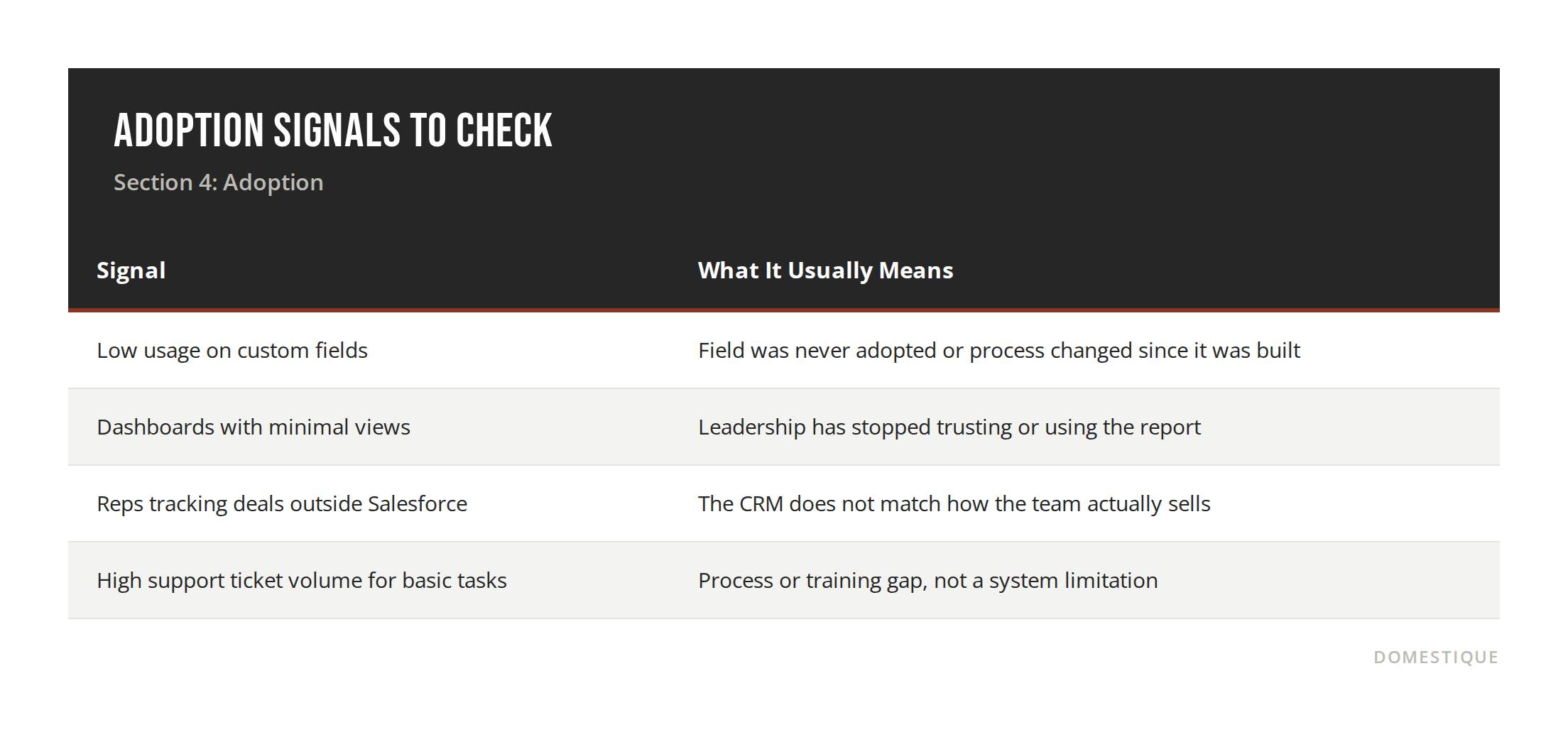
Section 4: Adoption Is the Clearest Signal Something Is Wrong
A technically clean org still fails if reps do not trust it or leadership cannot get a straight answer from a dashboard. Low adoption on key fields, dashboards nobody opens, and reps building workarounds outside Salesforce are all signs the org has drifted from how the business actually operates day to day.
This is often the fastest area to diagnose and the slowest to fix, since it usually points back to process or training gaps rather than a technical bug. It is also the area most audits skip entirely, because it requires talking to actual users instead of just running reports.
Section 5: Findings Are Not the Deliverable
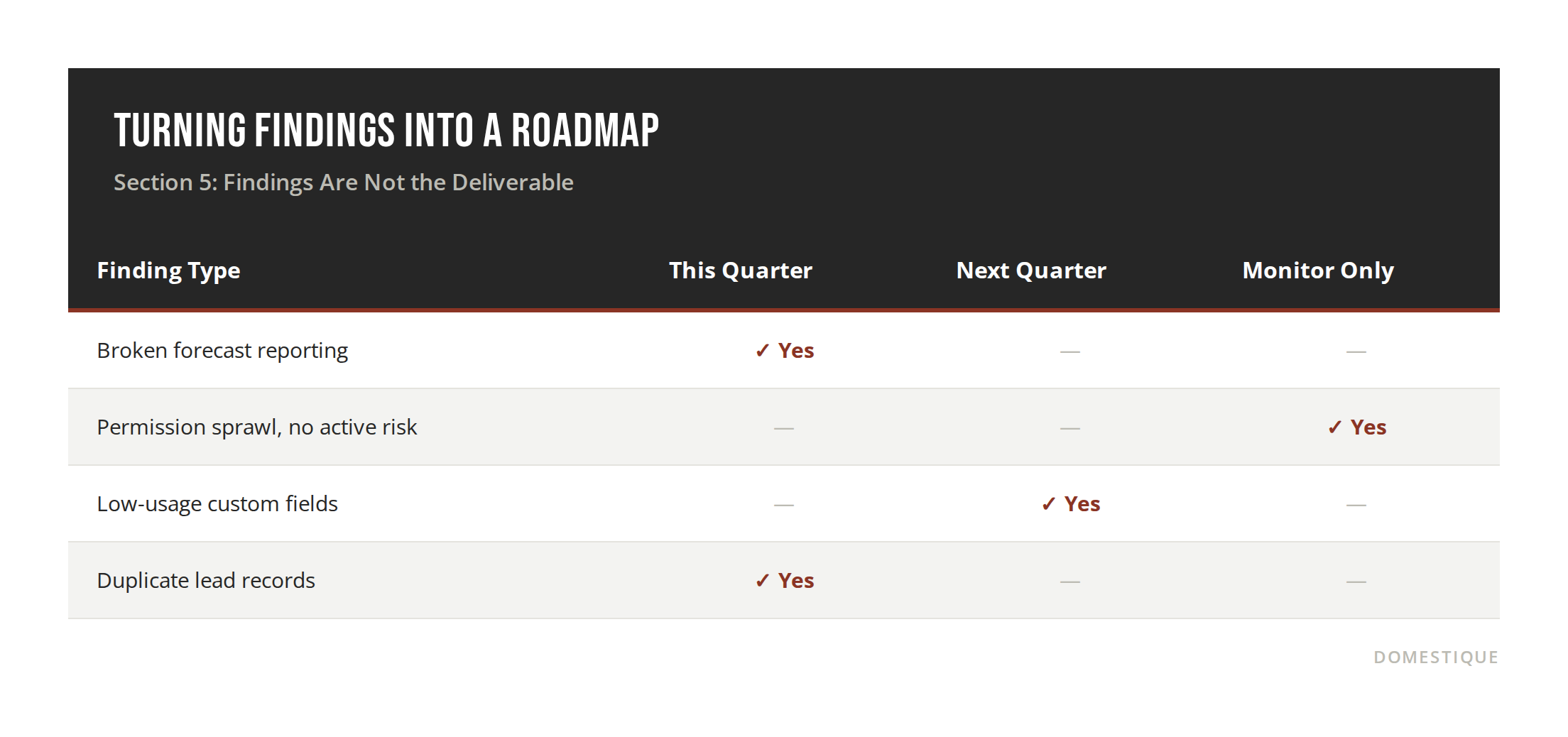
This is where most audits fall short. A list of forty issues with no prioritization is not useful to anyone, and it usually just sits in a shared drive unread. The deliverable that actually matters is a roadmap of key initiatives, with clear project plans attached: what needs to happen this quarter, what can wait, and what has to be true about the org for the business to hit its next goal.
That reframe changes the whole exercise. Instead of "here is what is broken," the health check becomes "here is what has to be fixed for the sales team to trust their pipeline again" or "here is what has to change before onboarding fifty new reps." The audit becomes the input to a plan, not the end of the conversation, and the roadmap only holds up if someone is actually executing against it.
FAQ
What is the difference between a Salesforce audit and a health check? They are largely the same idea. "Audit" tends to imply a compliance or security review, while "health check" usually covers the broader picture, including adoption and process fit. A thorough version of either should cover data, automation, security, and adoption.
How often should you run a Salesforce health check? For a smaller or simpler org, every two to three years is often enough. For a fast-growing company with custom code, multiple integrations, or frequent headcount changes, a lighter check once a year keeps small issues from compounding into a larger rebuild.
Who should be involved in a Salesforce audit? At minimum, an admin or architect familiar with the org's history, plus someone with visibility into current business goals. Involving both an internal and an external perspective tends to catch more than either one alone, since internal teams are often too close to their own decisions to evaluate them objectively.
What is the first sign an org needs a health check? Leadership stops trusting the reports. That is almost always the clearest signal, well before anything technical shows up in setup.
What is a Salesforce audit checklist supposed to include? At a minimum, a data quality review, an automation and process review, a security and access review, and an adoption check. A checklist that only covers one of these gives a partial picture at best.
Conclusion
A Salesforce health check is only as useful as what happens after it. The goal is not a spreadsheet of forty flagged issues, it is an honest assessment of whether the org can support the business over the next year, benchmarked against what a healthy org actually looks like, plus a prioritized roadmap for closing the gap if it cannot. Data quality, automation, security, and adoption all need a seat at the table, not just the cleanup items that are easiest to spot.
If your team has not looked closely at your org in the last year, or if you have hit one of the trigger events above, that is a strong signal to move this up the priority list.
Request a Salesforce Audit from Domestique
Sources:
AuditForce. "Salesforce Admin Blog." AuditForce, April 6, 2026. https://www.auditforce.cloud/blog
GoRevX. "Salesforce Audit 101: Why It Matters and How to Get It Right." GoRevX Blog, February 21, 2025. https://blog.gorevx.com/salesforce-audit-why-it-matters-and-how-to-get-it-right
Girikon. "Salesforce Security Audit Checklist: 12 Critical Checks Before Your Next Renewal." Girikon, 2026. https://www.girikon.com/blog/salesforce-security-audit-checklist/
NGS Solution. "Salesforce Security Best Practices Every Admin Should Follow." NGS Solution, 2026. https://ngssolution.com/blogs/salesforce-security-best-practices-every-admin-should-follow/
Damcogroup. "A Comprehensive Guide to Conducting a Salesforce Audit." Damco Group, December 16, 2024. https://www.damcogroup.com/blogs/guide-to-conducting-a-salesforce-audit-for-peak-performance-and-roi-optimization