If you are staring down a CRM migration, you already know the stakes. Move too fast and you drag years of dirty data into a brand new system. Move too slow and the project stalls while sales reps keep two tabs open just to find a phone number. Either way, the business feels it.
Most CRM migrations do not fail because the new platform is wrong. They fail because teams treat migration as a copy-paste job instead of a structured project with its own checklist, owners, and testing phase. Industry research consistently puts CRM implementation failure rates somewhere between 30 percent and 70 percent, and dirty data is the most common root cause.
This article lays out a CRM migration checklist built for B2B SaaS teams, along with the crm data migration best practices that keep pipeline, history, and reporting intact through the move.
In this article, you will find:
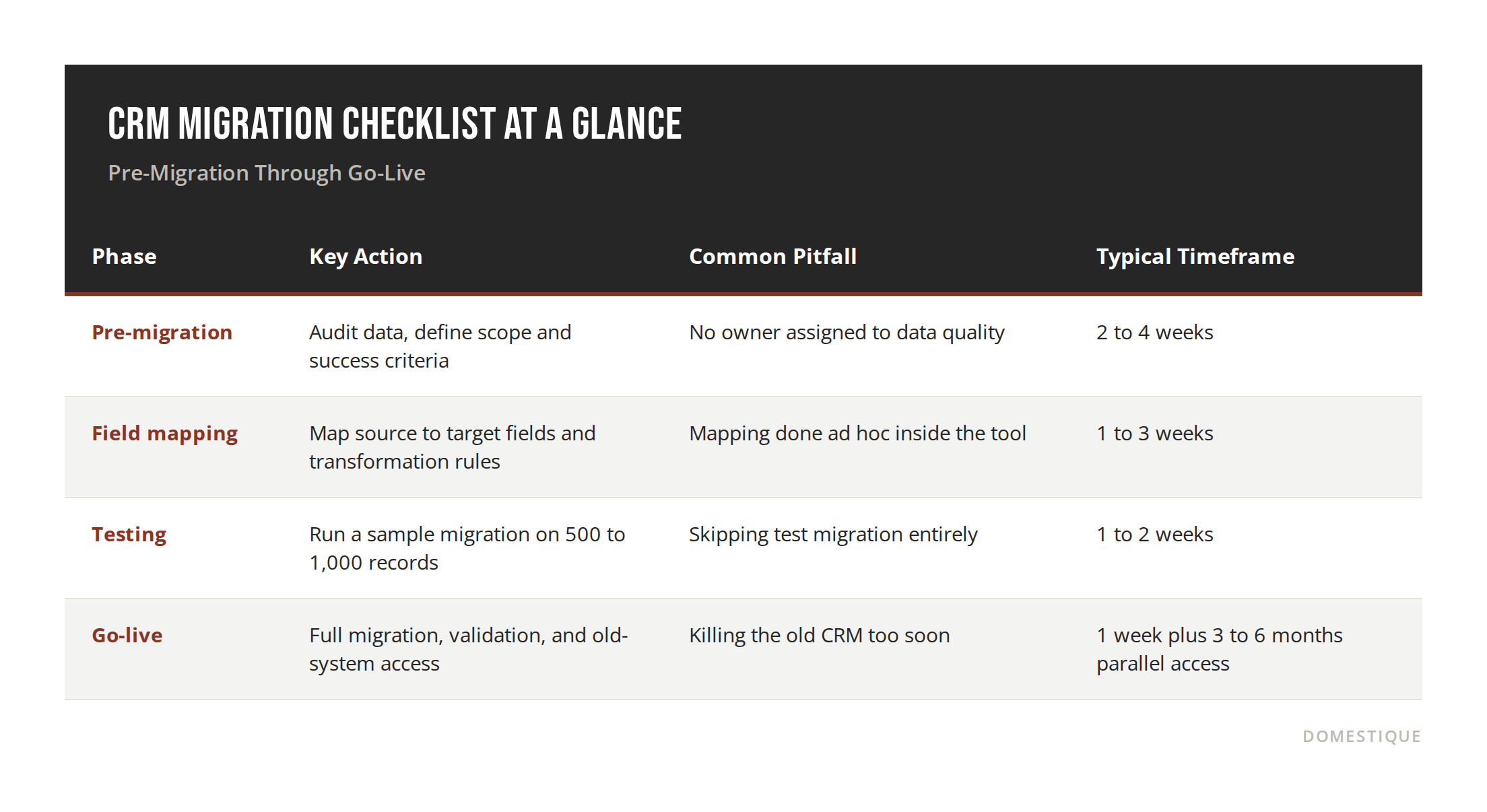
A 16-point checklist covering pre-migration, mapping, and go-live
What to audit before you export a single record
How to build a field mapping plan that will not break your reporting
A realistic timeline and budget range by company size
Answers to the questions B2B SaaS teams ask most before migrating
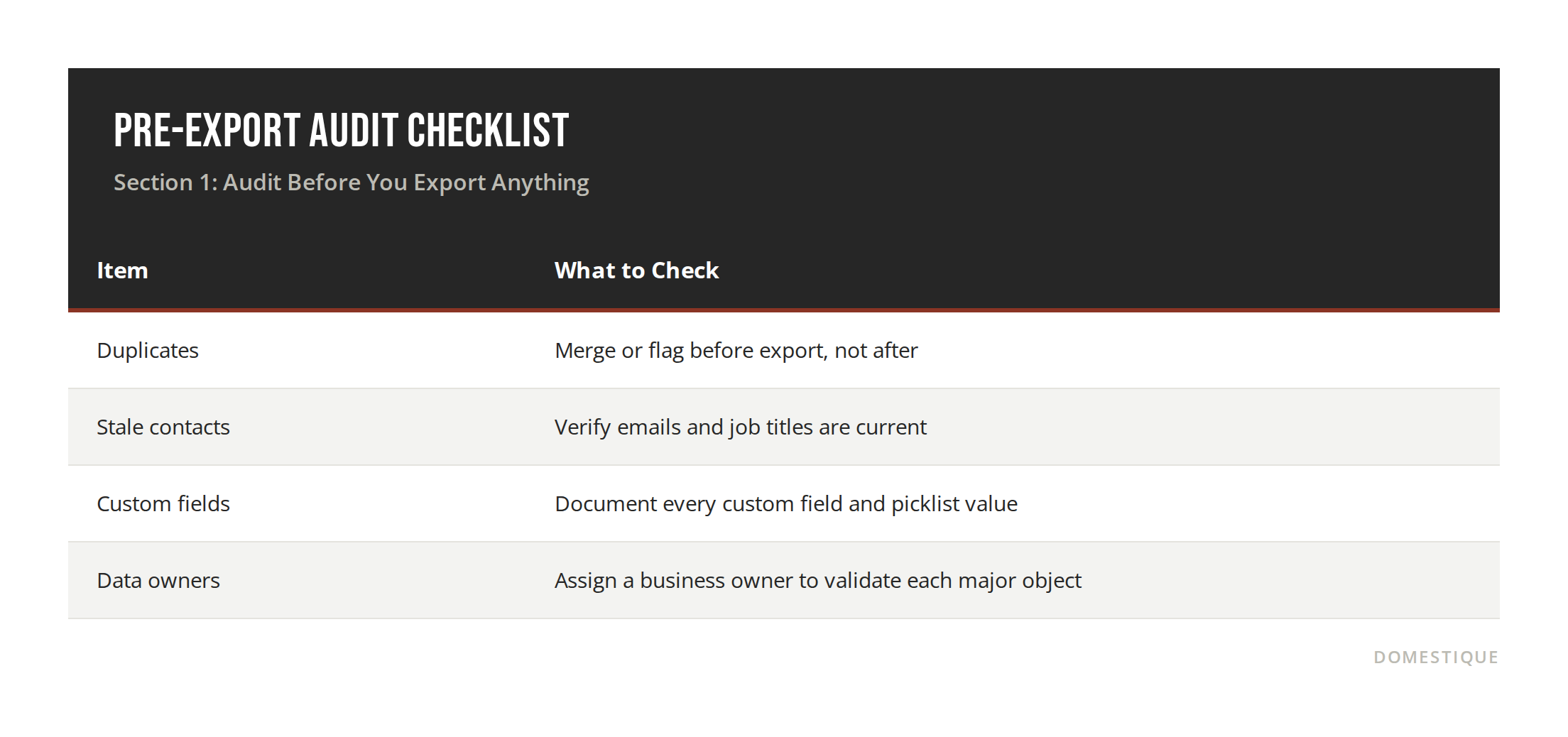
Section 1: Audit Before You Export Anything
Most CRMs carry a surprising amount of dead weight. Duplicate contacts, test records, and people who left their companies years ago routinely make up 30 to 40 percent of a database. Exporting that as-is just moves the mess into a cleaner-looking system.
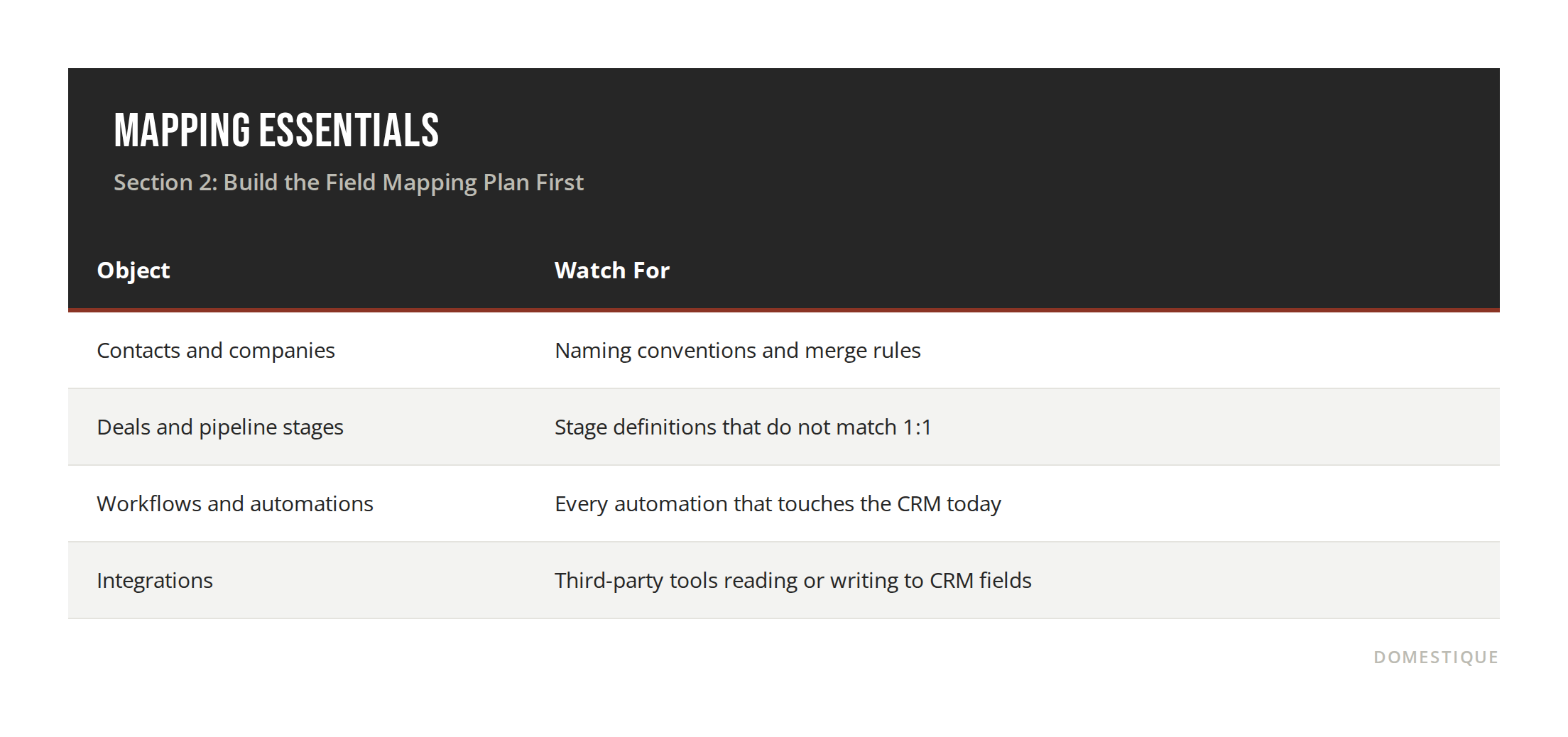
Section 2: Build the Field Mapping Plan First
Field mapping is where migrations quietly go sideways. Build this in a spreadsheet before you touch any migration tool: source field, target field, transformation rule. This single document is what prevents a lost custom field from surfacing three months later as a broken report.
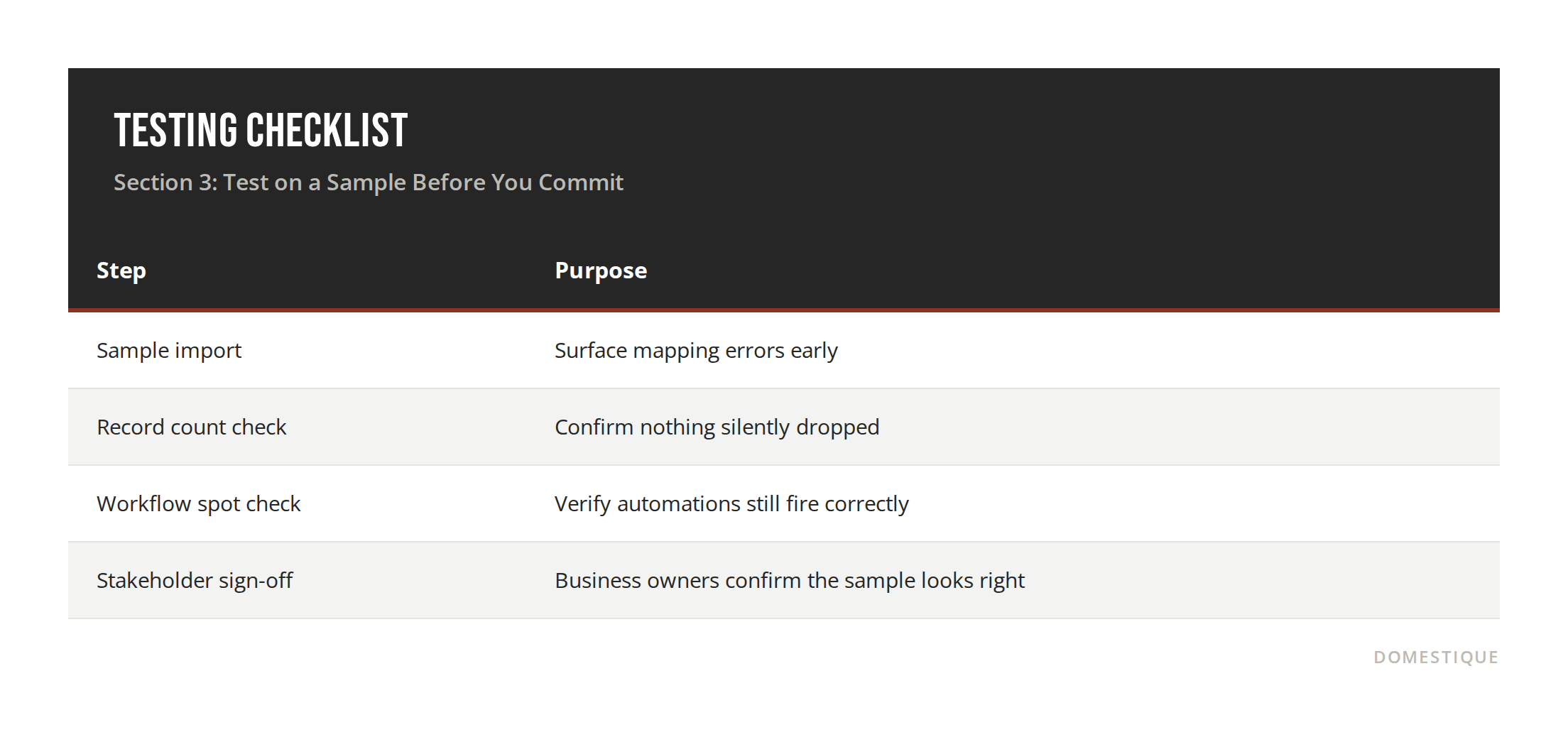
Section 3: Test on a Sample Before You Commit
Run the migration on a sample of 500 to 1,000 records that span every object type before moving the full dataset. This is where you catch a broken transformation rule or a mismatched picklist value while the cost of fixing it is still low.
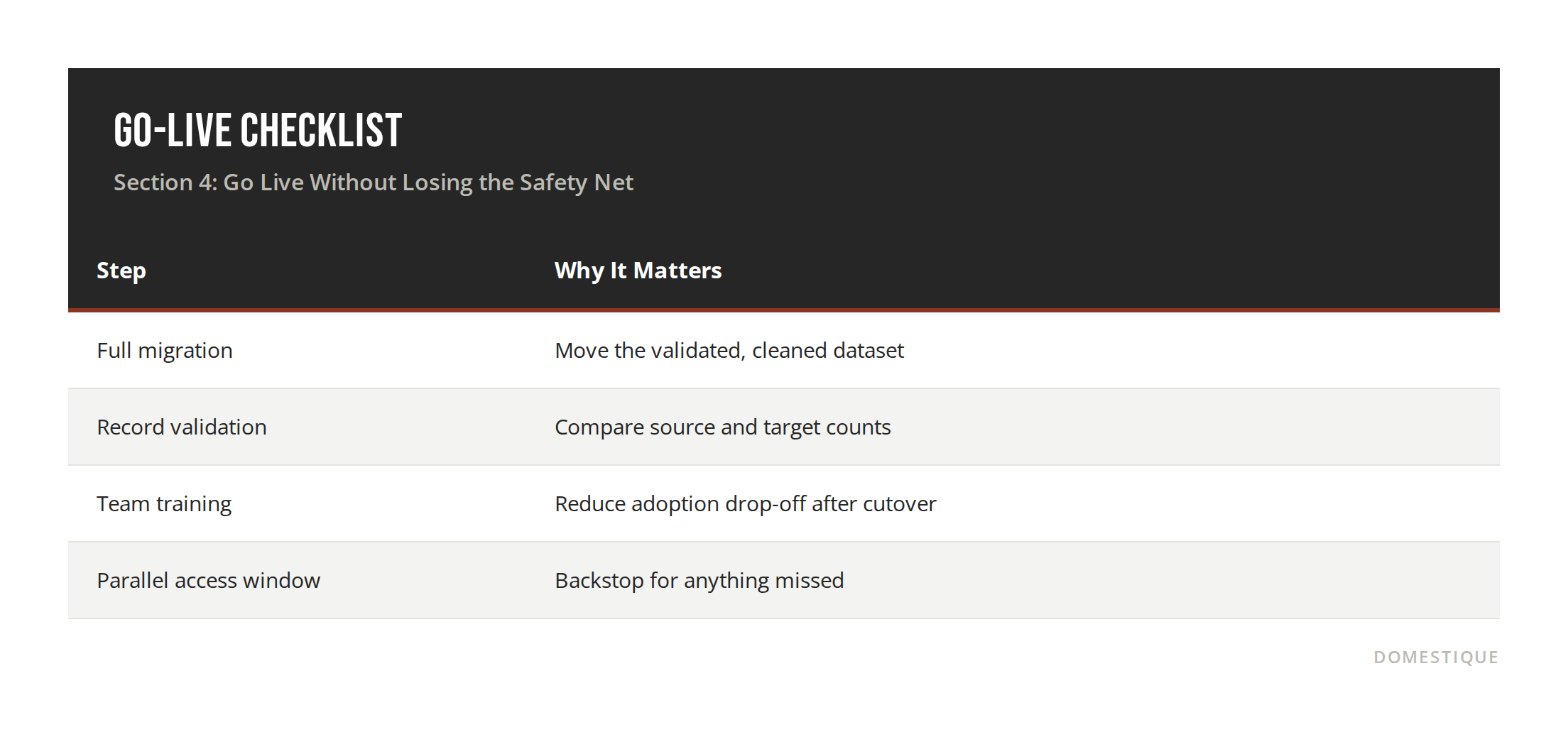
Section 4: Go Live Without Losing the Safety Net
Keep the old CRM accessible, read-only, for three to six months after cutover. Someone will need a call note or an old deal record you did not think to migrate. This parallel access is inexpensive insurance against a permanent gap in institutional memory.
FAQ
Q: How long does a CRM migration take for a B2B SaaS company? A: Small teams can complete a migration in about four weeks. Mid-market organizations typically need two to four months, and enterprise migrations with custom objects and multiple integrations can run six months or longer.
Q: What does a CRM migration checklist actually need to include? A: At minimum, a data audit, deduplication, field mapping, a sample test migration, full export and import, and team training. Skipping the test migration step is one of the most common causes of post-launch data problems.
Q: How much does a CRM migration typically cost? A: Budgets generally range from 5,000 to 200,000 dollars or more, depending on data volume, the number of custom objects, and how many integrations need to be rebuilt.
Q: Should we migrate all our historical CRM data? A: Not automatically. Decide scope deliberately. Outdated or duplicate records do not deserve a one-way ticket into the new system just because they exist in the old one.
Q: What is the biggest reason CRM migrations fail? A: Dirty data. Duplicate contacts, dead email addresses, and missing fields cause more downstream reporting and adoption problems than any issue with the software itself.
Conclusion
A CRM migration is not really a software project. It is a data quality project with a software deadline attached. Teams that treat the checklist above as sequential, not optional, come out the other side with pipeline history intact, reporting that still makes sense, and a sales team that trusts the new system on day one. Teams that skip the audit and mapping steps usually find out what broke the hard way, months after go-live.
If your team is planning a CRM migration and wants a second set of eyes on the data audit or field mapping plan before you touch a single export,
Sources:
Copper CRM. "CRM data migration: What are the best practices for a clean database?" Copper, 2026. https://www.copper.com/resources/crm-data-migration-best-practices
Vantagepoint. "CRM Data Migration Best Practices: Checklist." Vantagepoint, 2026. https://vantagepoint.io/blog/sf/crm-data-migration-best-practices-guide
Velvetech. "CRM Data Migration Checklist: 10 Steps for a Strategic Move." Velvetech, 2026. https://velvetech.com/blog/crm-data-migration-checklist/
Prospeo. "CRM Data Migration: 2026 Step-by-Step Playbook." Prospeo, 2026. https://prospeo.io/s/crm-data-migration
Devart. "CRM Migration Guide: Key Steps & Best Practices for Success." Devart, 2025. https://www.devart.com/blog/crm-migration.html