Most teams open a fresh HubSpot portal, start clicking around, and end up with a CRM that technically works but doesn't actually reflect how their business operates. Deal stages don't match the real sales process. Properties get created twice. Reports come back wrong because nobody agreed on what "closed won" means before the data started flowing in.
This usually happens because HubSpot CRM setup gets treated as a software task instead of a process task. The tool is flexible enough to model almost any go-to-market motion, but that flexibility means it will faithfully replicate whatever structure you give it, good or bad.
This guide walks through the setup sequence that actually holds up: what to decide before you open the platform, how to configure the account so it matches your process, and where teams typically get tripped up.
In this article, you will find:
A quick-reference table showing each setup phase and how long it realistically takes
How to map your data model before touching any HubSpot settings
The account foundations to configure first, and why order matters
How to build a pipeline that reflects your actual sales process, not a template
What to connect and automate once the core setup is stable
How to get your team using it correctly from day one
Map Your Data Before You Touch HubSpot
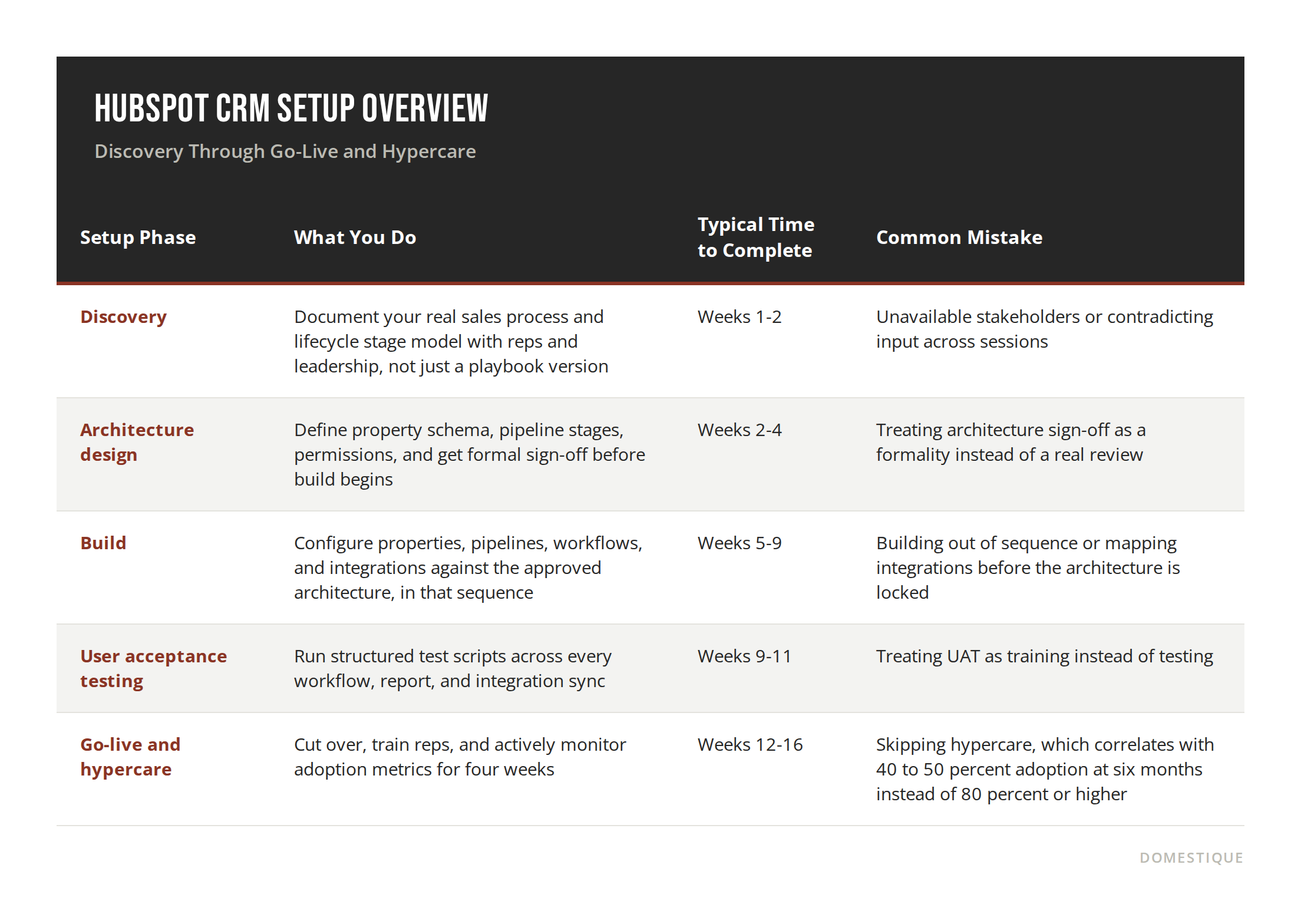
Before you create a single property, decide what a contact, company, and deal actually mean for your business. This is discovery, and it typically runs the first one to two weeks of any real implementation. Most setup problems trace back to skipping or rushing this step, because HubSpot will let you build almost anything, including a structure that contradicts itself three months later.
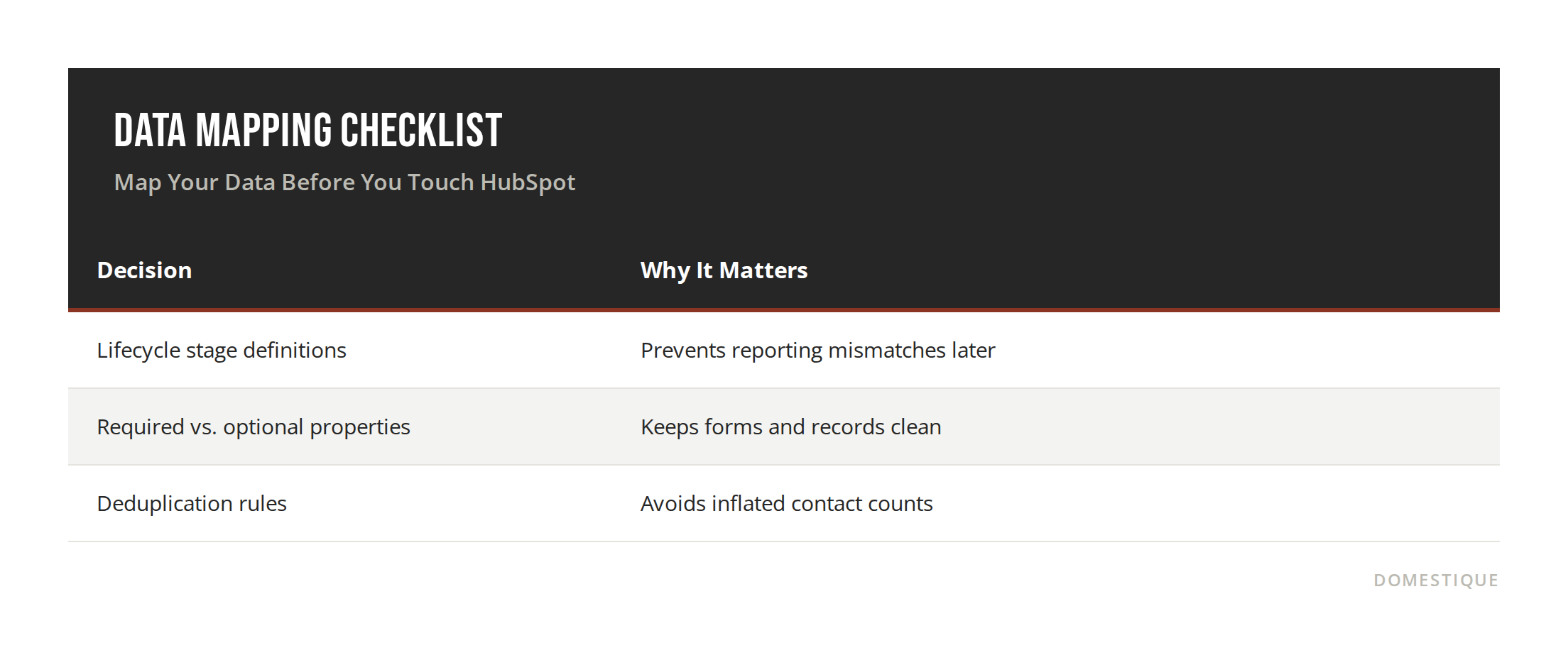
Write down your lifecycle stages in plain language first: what separates a lead from a marketing qualified lead, and what separates that from a sales qualified lead. There's no published industry figure for how many custom properties a typical onboarding creates, this varies too much by hub mix and data model to be a real stat, so we're speaking from what we consistently see across our own client portfolio rather than citing a number. Getting this on paper before setup avoids the rebuild that so many teams go through in month two.
Configure Your Account Foundations
Once discovery is done, architecture design typically runs weeks two through four. This is where you set up users, teams, and permissions, and where your property schema and pipeline stages get formal sign-off before anyone touches the build. Assign roles based on what each person actually needs to see and edit, not by default admin access, since overly broad permissions are one of the most common sources of accidental data damage in a new portal.
This phase is also where you lock in your email domains, sending limits, and calendar connections. Domain authentication is worth taking seriously here: recent scans of over 5 million domains found only about 30 percent have a valid DMARC record in place, meaning most sending domains still aren't properly authenticated. HubSpot doesn't publish an account-specific deliverability failure rate, but the broader authentication gap is real, and it's a common reason marketing emails land in spam within the first few weeks of a new portal. Getting this right early prevents that scramble.
Build Your Pipeline and Deal Stages
This is the step where a generic HubSpot CRM setup guide and a setup that actually fits your business diverge. Build typically runs weeks five through nine, and it should happen in a defined sequence: properties first, then pipelines, then lifecycle stage logic, then workflows, then integrations. Skipping that order is one of the most common sources of rework later.
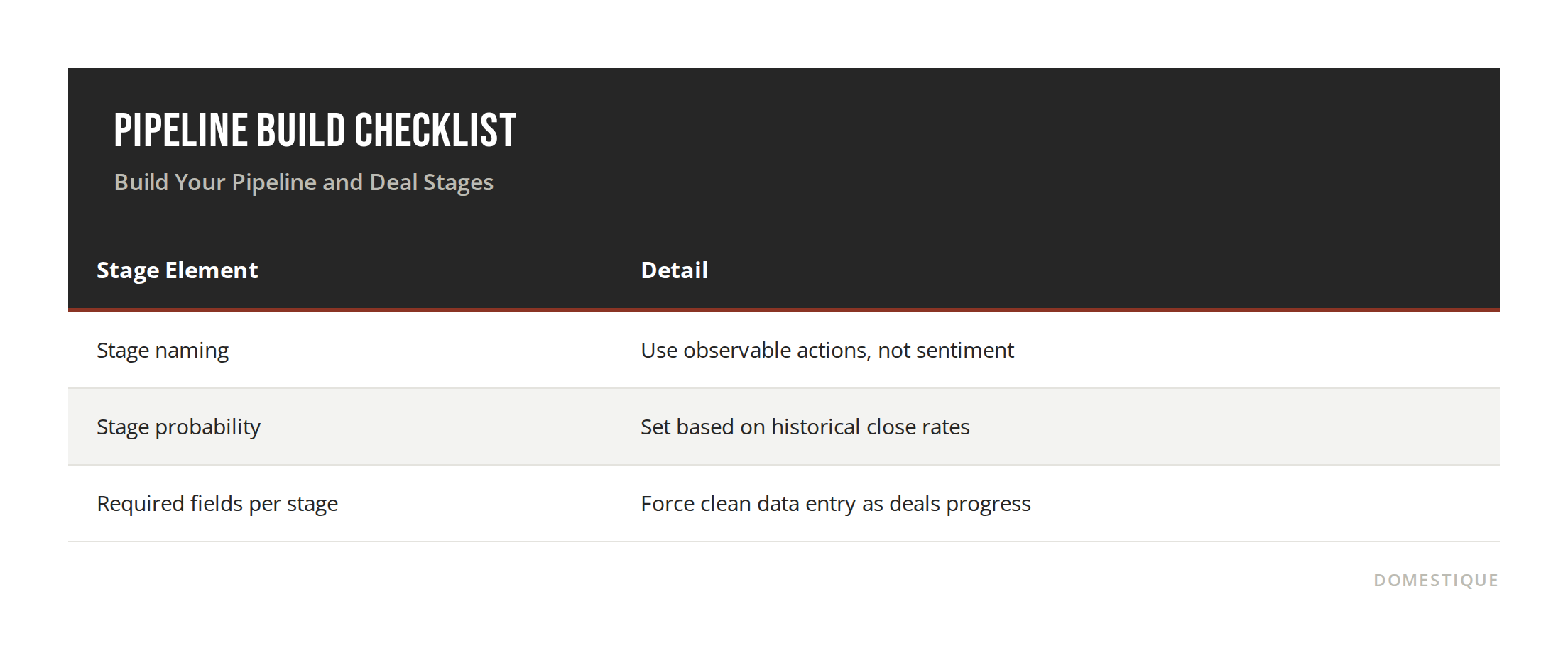
Your deal stages should mirror the questions your sales team asks internally, like "has this prospect seen pricing" or "is procurement involved yet," not a default template pulled from HubSpot's onboarding flow. Map every stage to a specific, observable action, not a feeling. "Interested" is not a deal stage. "Technical evaluation scheduled" is.
Connect Your Tools and Automate the Handoffs
Only after the pipeline is stable should you connect other tools: your email provider, calendar, ad accounts, and any billing or support software. Automating handoffs before the pipeline is finalized just means rebuilding those automations later.
The upside is real. HubSpot's own ROI data shows customers using integrations close 8 times more deals than those without, and customers using the full platform across multiple hubs close 31 percent more deals than those using Sales Hub alone. Start with the integrations that remove manual data entry, since those deliver the fastest visible return and build internal trust in the system.
Train Your Team and Set a Review Cadence
A correctly configured CRM still fails if reps don't use it consistently. Build a short training session around the specific fields and stages you just created, not a generic HubSpot tutorial, and set a recurring cadence, monthly at minimum, to review data quality and adjust the pipeline as your process evolves.
The adoption numbers back this up. HubSpot's own customer data shows most Sales Hub customers reach full operational use in about 6 weeks, and 86 percent of users report using it daily once it's set up correctly, largely because a well-configured system matches how reps already work rather than forcing a new process on top of the old one.
FAQ
Q: How long does a full HubSpot CRM setup take? A: A realistic mid-market setup runs 12 to 16 weeks from kickoff to stable operation, according to implementation partner benchmarks. The biggest cause of delay isn't data volume or integration complexity, it's decision latency: stakeholders unavailable during discovery and architecture review, which pushes every phase downstream.
Q: Can I migrate data from another CRM into HubSpot? A: Yes. HubSpot supports imports from most major CRMs, though the migration works best after your data model and lifecycle stages are already defined, not before.
Q: Do I need HubSpot's paid tiers to complete a proper setup? A: The free CRM covers contact, company, and deal records. Custom pipelines, advanced automation, and reporting typically require a paid tier, depending on your process complexity.
Q: What's the biggest mistake teams make during HubSpot CRM setup? A: Building the pipeline and properties before agreeing internally on what each stage and field actually means. That misalignment shows up later as unreliable reporting.
Conclusion
A HubSpot CRM setup that holds up isn't the one built fastest, it's the one built in the right order: discovery first, architecture second, build third, testing fourth, and go-live with active hypercare last. Skipping ahead to build before the architecture is signed off, or skipping hypercare after go-live, is the most common reason teams end up rebuilding their portal within the first year.
Getting this sequence right the first time saves months of cleanup later and gives your team a system they can actually trust.
Sources:
HubSpot. "ROI of HubSpot's Customer Platform." HubSpot 2023 Annual ROI Report, cited via https://www.hubspot.com/roi (HubSpot's guidance permits citing this URL as the source for ROI report data points; the integrations and platform-adoption figures above come from the 2023 edition, while the 6-week operationalization and daily-use figures come from the more recent edition HubSpot currently publishes at the same URL).
DMARC Guard. "DMARC Adoption Rate 2026: 30.4% of 5.5M Domains." dmarcguard.io, 2026. https://dmarcguard.io/research/email-authentication/
Pedowitz, Jeff. "HubSpot CRM Implementation Timeline: What to Expect Week by Week." The Pedowitz Group, June 15, 2026.