HubSpot Optimization: A Practical Playbook
Your HubSpot portal has more going on in it than you probably realize, and most of it is working against you. Duplicate contacts, pipeline stages nobody uses, properties that made sense two years ago, and reports that take 20 minutes to interpret. The tool isn't the problem. The setup is.
HubSpot is one of the most capable CRM and marketing platforms available to mid-market B2B companies. But capability only matters if the configuration reflects how your team actually sells and operates. A messy HubSpot CRM setup compounds over time: bad data feeds bad decisions, and bad decisions kill revenue.
This playbook is built on what Domestique, a HubSpot Platinum Partner with a 12-year RevOps framework, sees repeatedly across portal audits. It covers the highest-leverage places to focus your HubSpot optimization effort, from pipeline architecture to contact hygiene to reporting that your leadership team will actually use.
In this article, you will find:
Why most HubSpot portals degrade over time and how to reverse it
How to audit and restructure your pipeline stages for accuracy
The contact and company property cleanup that unlocks better segmentation
How to build reports that reflect real GTM performance
What a forward-looking HubSpot setup looks like as AI tools mature
HubSpot Optimization at a Glance
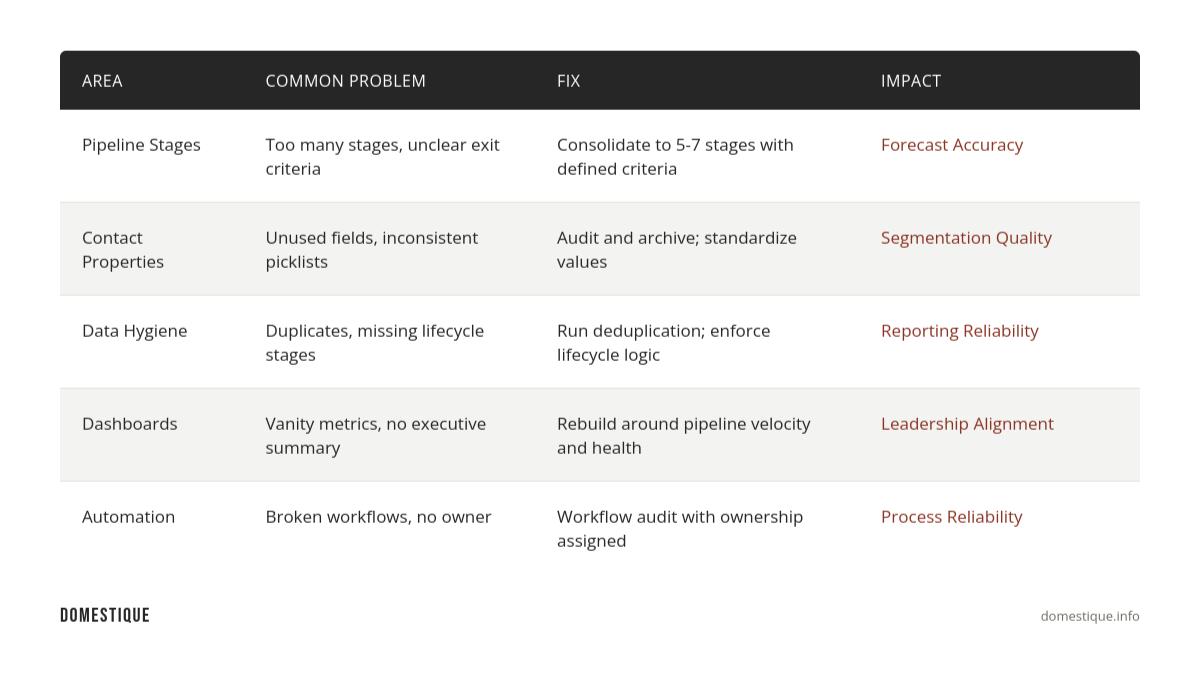
Section 1: Why HubSpot Portals Degrade Over Time
HubSpot is easy to start using and easy to abuse. The low friction that makes onboarding fast is the same reason portals accumulate junk. A new sales rep creates a custom property. Marketing builds a workflow and forgets about it. Someone creates a second pipeline "just for partnerships" and it never gets cleaned up.
The result is a portal that technically works but practically misleads. Sales leaders can't trust the pipeline because deals get stuck in "Proposal Sent" for 90 days. Marketing can't segment accurately because lifecycle stages are assigned inconsistently. RevOps is spending more time debugging than building.
Across HubSpot audits, Domestique's consultants consistently surface the same failure patterns regardless of company size or industry. The problems below are not edge cases — they show up in the majority of portals we review.
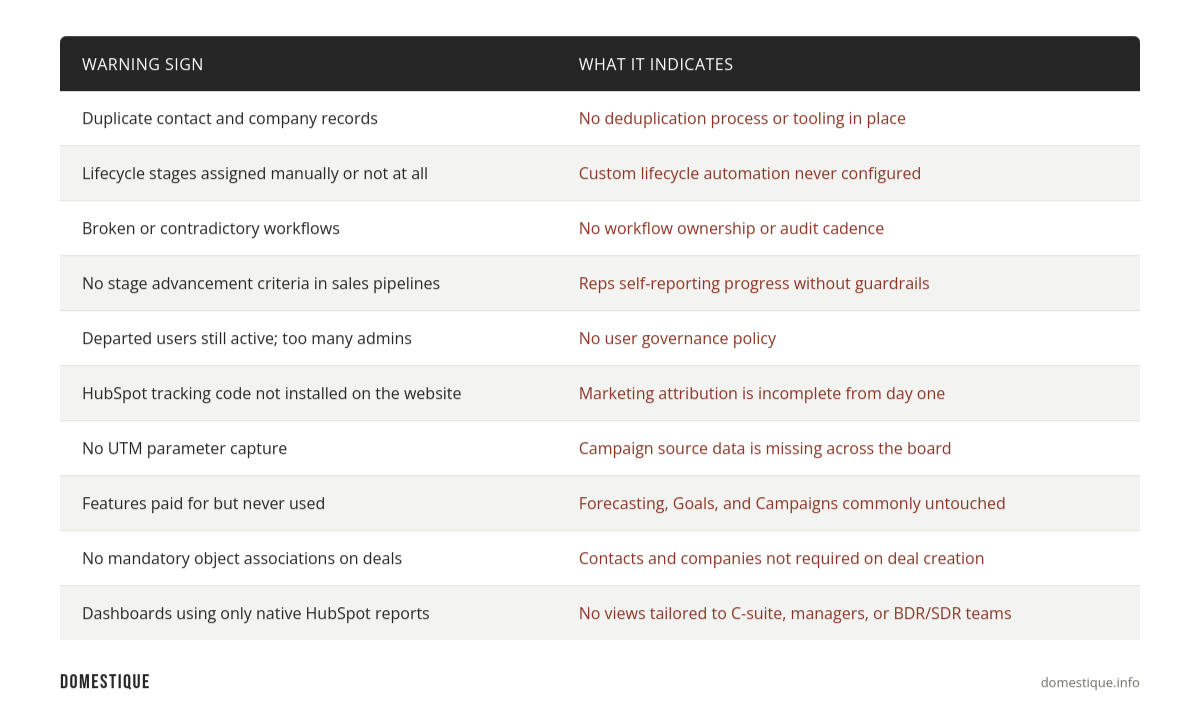
Section 2: How to Audit and Restructure Your Pipeline
The single highest-value HubSpot optimization move for most B2B companies is simplifying their pipeline. Most teams have too many stages that reflect internal process steps rather than buyer behavior, which makes it impossible to forecast accurately. Across Domestique's portal audits, we consistently find that roughly 25 percent of active workflows are broken or no longer serving their original purpose, and portal property counts range from under 500 fields to over 3,000, with 15 to 35 percent of those fields effectively unused. The bloat compounds quickly when there is no governance policy in place.
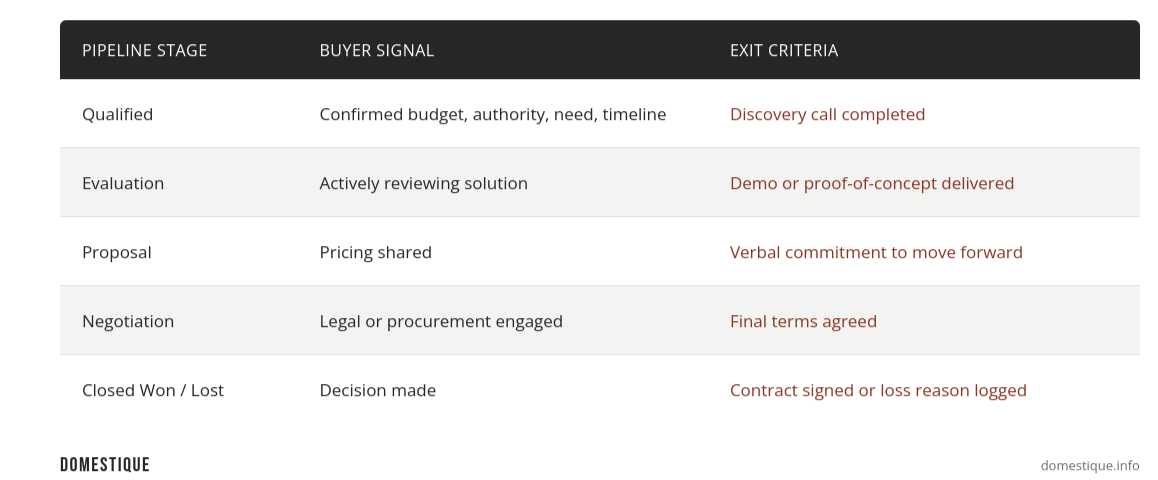
Start with a pipeline audit: export every deal in your CRM and look at where deals are spending the most time. Stages with high average age are usually too vague or redundant. In Domestique's experience, most B2B sales pipelines land between five and eight stages in practice, and a significant share of teams are still running HubSpot's out-of-the-box stages without customization. That default setup rarely reflects how a mature sales team actually qualifies and advances deals. A well-structured pipeline maps to clear buyer decisions, not internal handoffs, and it needs stage advancement criteria enforced inside HubSpot, not just agreed upon in a team meeting, so that deal progression reflects reality rather than rep optimism.
Three audit findings that surface in almost every Domestique engagement: no stage advancement criteria configured inside the pipeline settings, multiple pipelines that are not meaningfully different from one another and create reporting noise, and no mandatory object associations requiring a contact and company record on every deal. Each of these quietly degrades forecast accuracy and makes it harder to identify where revenue is actually being lost.
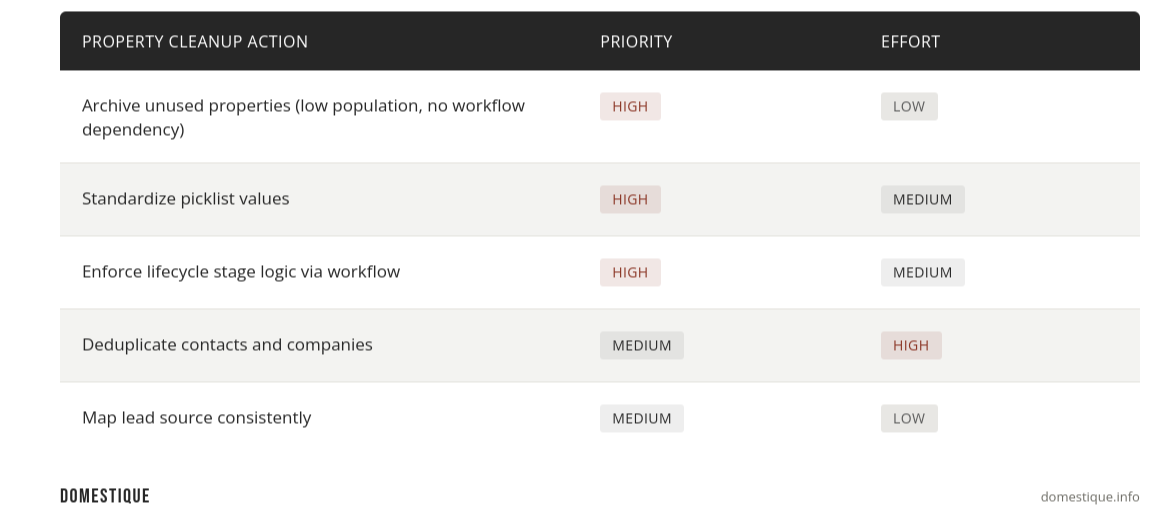
Section 3: The Contact and Company Property Cleanup
Most HubSpot portals accumulate far more contact properties than anyone actively uses. Across Domestique's audits, we've seen portal property counts range from under 500 to over 3,000, with between 15 and 35 percent of those fields effectively unused. That excess creates form friction, slows down record loading, and makes segmentation feel impossible. A lean HubSpot CRM setup outperforms a bloated one every time.
Run a property usage audit inside HubSpot (Settings > Properties > filter by usage). Properties with low population rates and no active workflow dependency are candidates for archival. Pay particular attention to fields that were created by individual users rather than admins, these are frequently duplicates of existing properties with slightly different names, and they quietly fragment your data. More importantly, look at your picklist properties: if "Industry" has 47 values including "Technology," "Tech," "SaaS," and "Software," your segmentation is already broken.
Section 4: Build Reports Your Leadership Team Will Actually Use
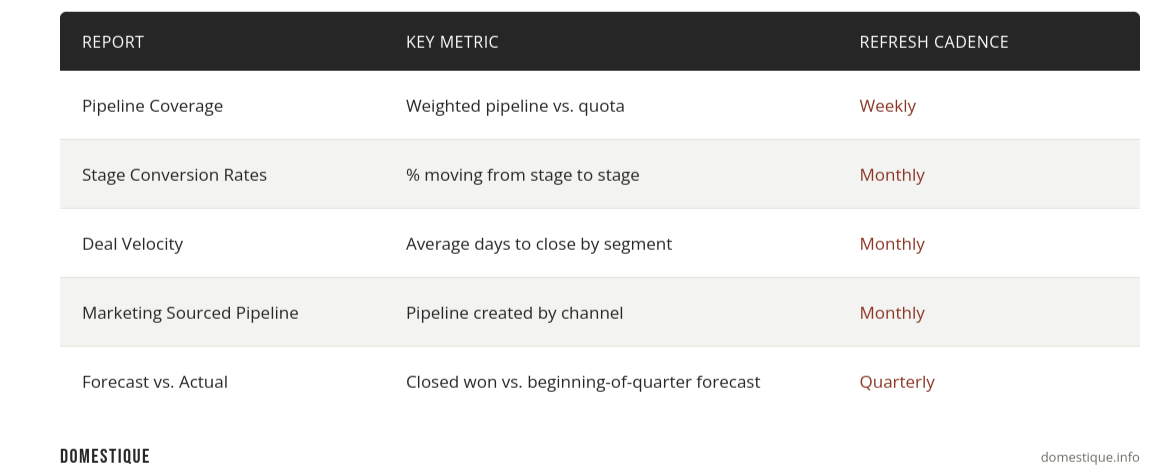
Most HubSpot reporting setups optimize for volume metrics: contacts created, emails sent, deals opened. These numbers feel productive and mean almost nothing. What leadership actually needs to see is pipeline velocity, conversion rates by stage, and revenue coverage.
The most effective executive dashboards in HubSpot are built around three views: what is in the pipeline right now and is it enough to hit the number, where are deals dropping out and why, and how is marketing contributing to pipeline creation over the last 90 days. Everything else is noise until those three questions are answered.
Section 5: What a Forward-Looking HubSpot Setup Looks Like
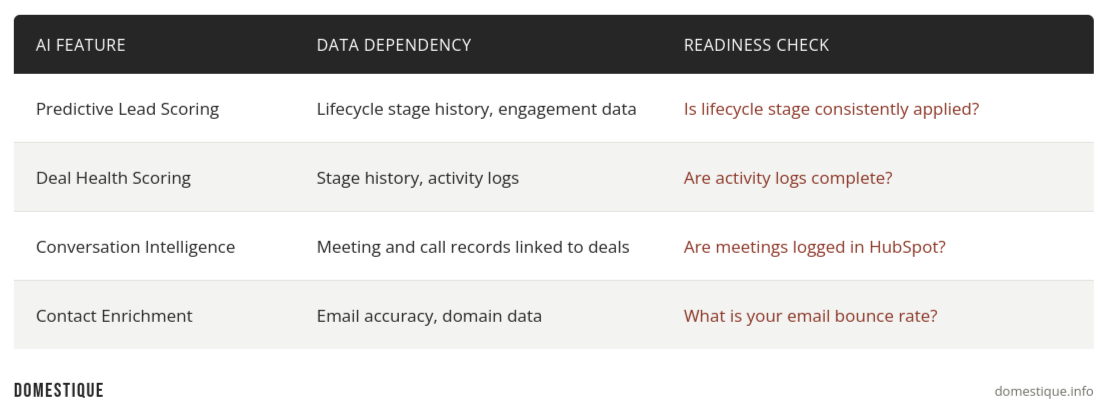
AI-assisted CRM tools are moving fast. HubSpot has already shipped AI features inside its Breeze suite, contact enrichment, deal scoring, conversation intelligence. But these tools only work well if the underlying data is clean. Garbage in, garbage out applies at every layer of the stack.
The companies getting the most out of AI-assisted selling in HubSpot right now are the ones who invested in data hygiene 12 to 18 months ago. They have clean contact records, consistent pipeline stages, and reliable source attribution. When AI tools ingest that data, the outputs are actually usable. For everyone else, the AI is just surfacing a more confident version of a wrong answer.
FAQ
Q: What is HubSpot optimization and where should I start? A: HubSpot optimization is the process of aligning your portal configuration with how your team actually sells and markets. The highest-leverage starting point for most teams is a pipeline audit followed by a contact property cleanup, since these two areas affect every downstream report and workflow.
Q: How long does a HubSpot CRM setup audit take? A: A focused audit of pipeline stages, properties, workflows, and reporting typically takes two to three weeks for a mid-market B2B company. The cleanup and implementation that follows usually runs four to eight weeks depending on data volume and how many stakeholders need to be aligned.
Q: How do I know if my HubSpot data is clean enough to trust? A: Look at three signals: your contact-to-company association rate, your lifecycle stage population rate across active contacts, and your deal close date accuracy. If deals are sitting in pipeline with close dates in the past, or a significant share of contacts have no lifecycle stage assigned, data quality is actively misleading your reporting.
Q: Can HubSpot optimization improve sales forecast accuracy? A: Yes, directly. Forecast accuracy is downstream of pipeline stage discipline. When stage definitions are clear, exit criteria are enforced, and reps are updating deal records consistently, the pipeline becomes a reliable input for forecasting rather than a wishlist.
Conclusion
HubSpot optimization is not a one-time project. It is an ongoing practice of keeping your configuration aligned with how your business actually operates. The companies that get the most value from HubSpot are not the ones who bought the most seats or turned on the most features. They are the ones who kept the data clean, the pipeline honest, and the reporting focused on decisions rather than activity.
If your portal has drifted, the good news is that most of the damage is reversible. Domestique has run this playbook across dozens of HubSpot portals as a Platinum Partner, and a focused audit almost always surfaces more leverage than teams expect. A few weeks of cleanup work will get you further than another year of working around the mess.
Download the RevOps Maturity Checklist
Sources: HubSpot. "HubSpot State of Marketing Report." HubSpot Research, 2024. https://www.hubspot.com/state-of-marketing
Gartner. "Market Guide for Revenue Operations Platforms." Gartner, 2024. https://www.gartner.com
SiriusDecisions / Forrester. "B2B Revenue Waterfall Benchmark." Forrester Research, 2024. https://www.forrester.com