HubSpot Best Practices: The Configuration Playbook
Most HubSpot problems aren't HubSpot problems. They're configuration debt from a decision nobody planned to live with this long, and by the time it starts hurting, blaming the platform is just easier than admitting whose job it was to fix.
You've probably seen the symptoms. Reports that don't match between teams. Workflows nobody remembers building. A "Lead Score 2" property sitting next to the original "Lead Score" that everyone stopped using years ago. None of this is HubSpot's fault. It's the bill coming due on a portal nobody's owned in years.
This is where HubSpot best practices actually start: not with a new feature, but with the underlying architecture. Get the configuration right and reporting, automation, and sales handoffs all get easier. Get it wrong and you're not just rebuilding the same reports every quarter, you're paying rent indefinitely on decisions someone made two years ago and never had to revisit.
In this article, you will find:
Why the object model matters more than any workflow you'll ever build
The property hygiene habits that keep a portal usable as it scales
HubSpot workflow best practices that hold up once your go to market motion gets complex
Why configuration is the real foundation for AI readiness, not a side project
Answers to the questions RevOps and marketing ops teams ask most about HubSpot configuration
Start With the Object Model, Not the Automation
Teams tend to jump straight to building workflows because workflows feel like progress. But a workflow built on a messy property structure just automates the mess faster.
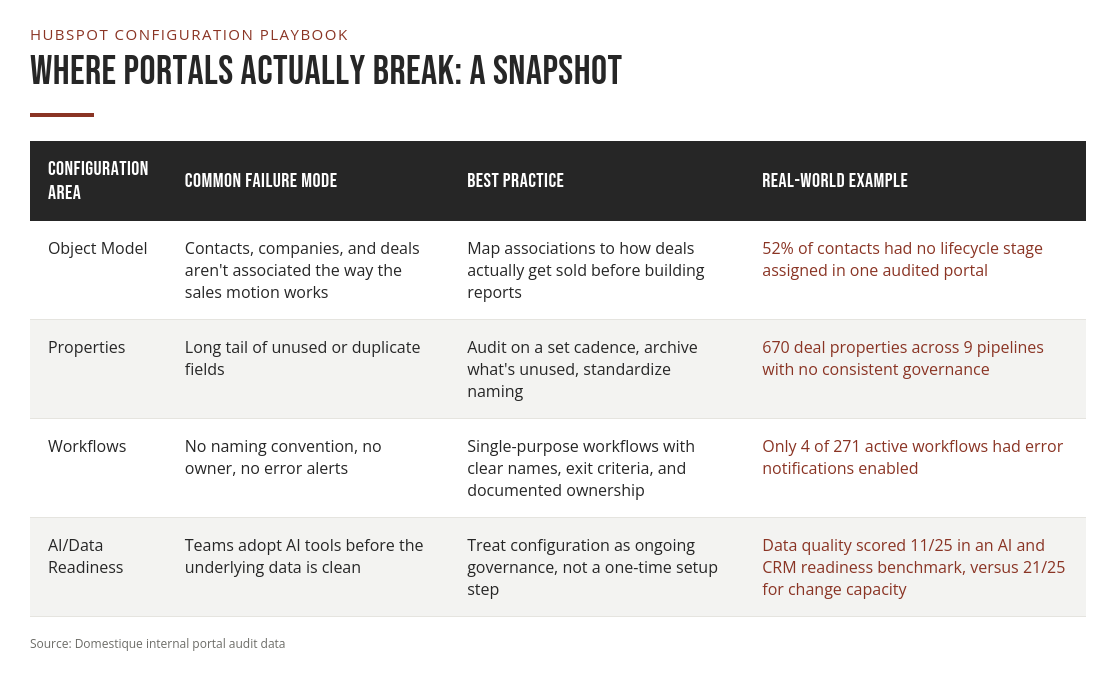
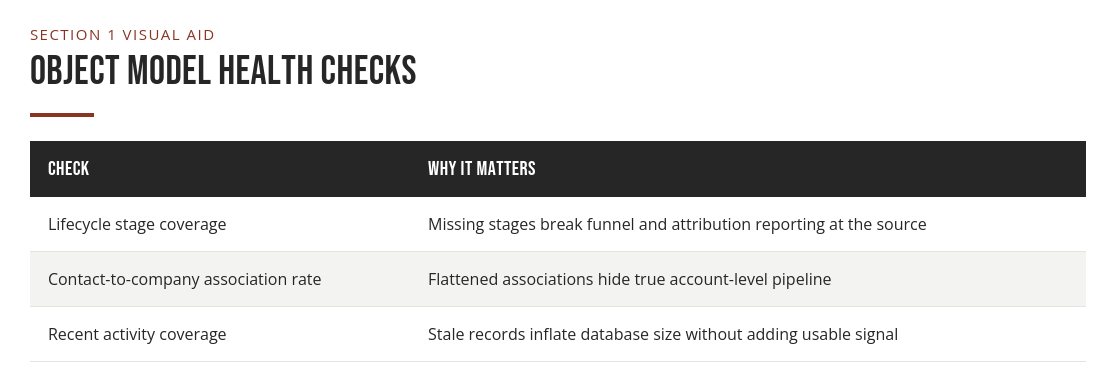
Before touching automation, look at your object model. Are companies, contacts, and deals connected the way your sales motion actually works, or is everything getting flattened into a single contact record? This matters more than it sounds like it should. In one portal we audited, 52 percent of contacts had no lifecycle stage assigned, and 98 percent showed no activity in over a year. Neither number shows up in a pipeline report, but both quietly break every funnel calculation built on top of them.
Property Hygiene Is Not Busywork
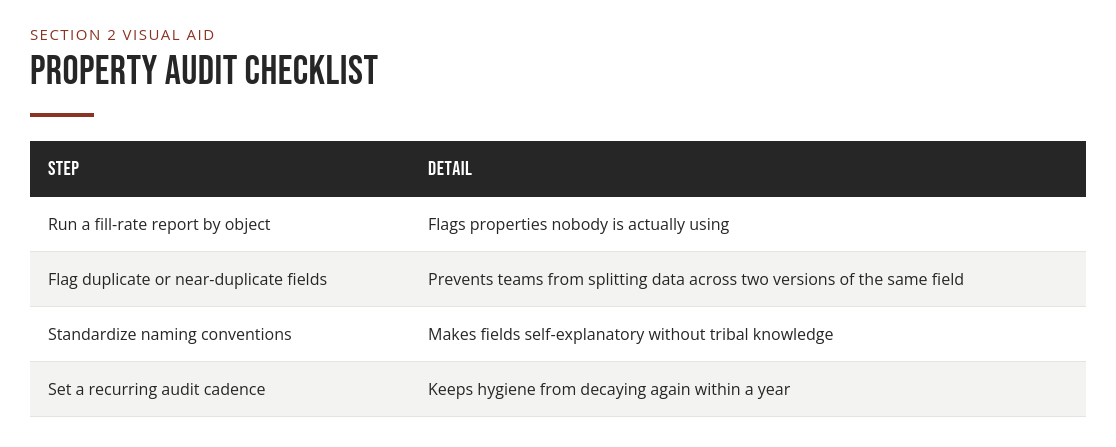
Every HubSpot portal we've looked at has some version of this problem. In one of the messier portals we've audited, nearly one in four active custom fields had never been filled in at all, and the deal object alone carried 670 properties across nine pipelines with no consistent governance. Multiply that across every object and finding the field you actually need takes longer than it should.
The fix isn't complicated, but it takes discipline. Audit properties on a regular cadence, archive what isn't used, and standardize naming so a new hire can tell what a field does without asking someone who left two years ago.
HubSpot Workflow Best Practices
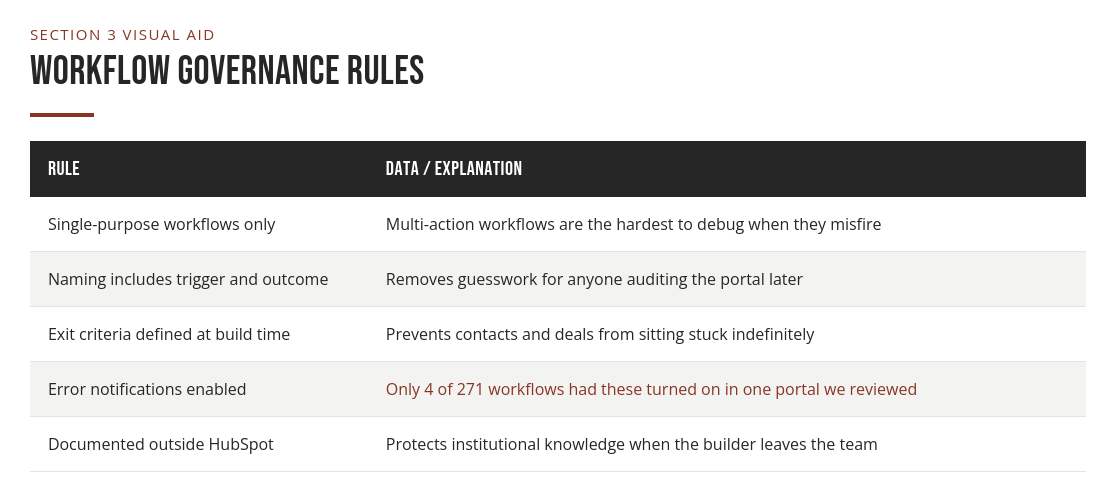
Workflows are where configuration either pays off or falls apart. A few principles hold up across nearly every portal we've worked in. Keep workflows single-purpose: a workflow that updates a property, sends a notification, and triggers a sequence is impossible to debug when something breaks. Name workflows so their function is obvious at a glance, including the trigger and the outcome. "Lead Routing: MQL to SDR Queue" tells you what it does. "Workflow 14" does not. In one portal, 271 workflows were active, but only 4 had error notifications turned on, and none had a consistent naming convention or documented owner.
Build in exit criteria, not just enrollment criteria. Contacts get stuck in workflows more often because nobody defined when they should leave than because the trigger logic was wrong. We've also seen the opposite failure: a renewal auto-create workflow with no re-trigger logic, so it fired once per customer and quietly stopped working for every renewal after the first. Nobody noticed until someone went looking for missing renewal records.
Governance Is a Forward-Looking Investment
The teams getting the most out of HubSpot right now aren't the ones with the most workflows. They're the ones who treat configuration as ongoing governance, not a one-time setup project. That matters more as AI-assisted tools start reading directly from CRM data to score leads, draft outreach, and flag risk.
When we ran an AI and CRM readiness benchmark on one portal, the overall score came in at 61 out of 100. Change capacity and AI governance both scored strong, in the low twenties out of 25, but data quality landed at just 11 out of 25. The team was more than ready to adopt AI tools. The data wasn't ready to be read by them.
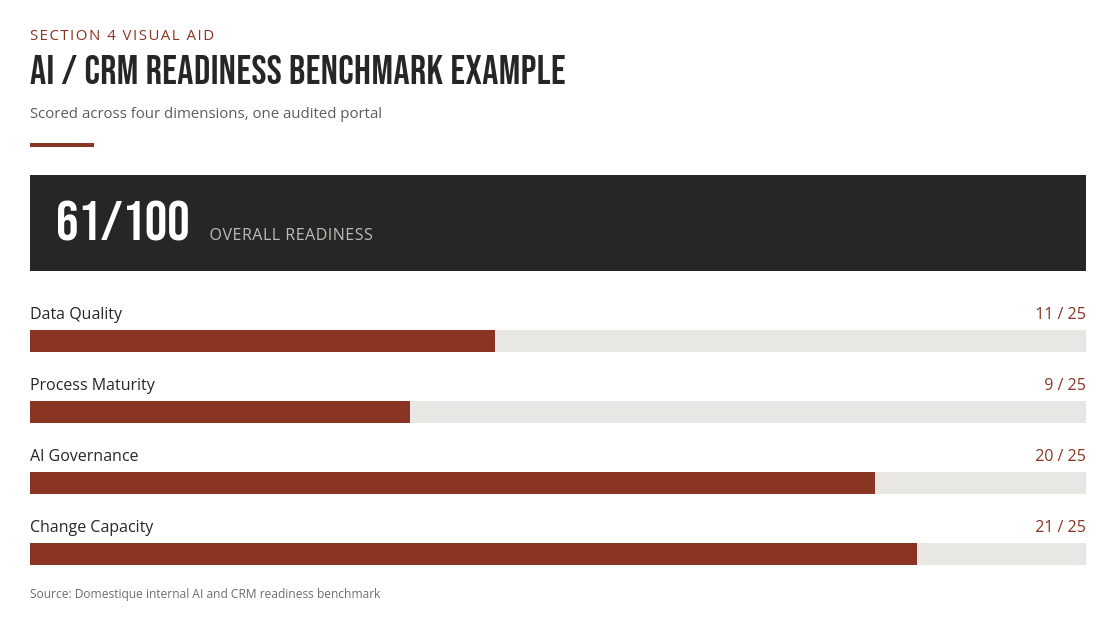
That gap is the real argument for configuration work. A clean, well-governed portal isn't just easier to report on today, it's what makes your team ready for what HubSpot builds next.
FAQ
Q: What are the most important HubSpot best practices for a growing team? A: Start with the object model and property structure before building more workflows. Clean associations and consistent properties make every report and automation downstream more reliable.
Q: What are the biggest hubspot workflow best practices to follow? A: Keep each workflow single-purpose, name it clearly with its trigger and outcome, define exit criteria alongside enrollment criteria, and turn on error notifications so failures get caught quickly.
Q: How often should we audit HubSpot properties and workflows? A: A quarterly review is a reasonable baseline for most portals, with a deeper annual audit to catch drift that accumulates from smaller changes made throughout the year.
Q: Does HubSpot configuration actually affect AI readiness? A: Yes. AI tools that score leads or draft outreach read directly from CRM data, so a portal with poor data quality will produce unreliable AI output regardless of how capable the tool is.
Q: Is it worth cleaning up an old portal, or should we start fresh? A: Cleaning up is almost always faster and less disruptive than a full rebuild. Most configuration problems are fixable through a structured audit rather than a wholesale migration.
Conclusion
Configuration work isn't glamorous, and nobody gets promoted for archiving unused properties. But it's the layer everything else in HubSpot depends on, and ignoring it doesn't make the cost disappear, it just moves the bill downstream. A clean object model, disciplined property hygiene, and well-governed workflows make reporting faster, automation more reliable, and your team ready for whatever HubSpot builds next. Bolt AI tools onto a messy portal and all you've built is a faster way to automate bad decisions. If you're not sure where your portal stands, the fastest path forward is an honest audit, not another automation build.
Sources
Domestique Internal Portal Audit Data, 2026.
HubSpot. "Organize and Manage Your Workflows." HubSpot Knowledge Base. https://knowledge.hubspot.com/workflows/organize-your-workflows