Salesforce Best Practices for Modern Sales Teams
If your reps are hesitant to trust the pipeline numbers in Salesforce, the problem usually isn't the reps. It's the data model underneath them, quietly accumulating duplicates, dead fields, and required fields that aren't actually required.
This happens because Salesforce orgs get built for a moment in time and then never revisited. Every new integration, sequencer, and automation adds fields and records faster than anyone cleans them up, and within a few years the org is carrying more structure than the business actually uses.
This article walks through where that decay shows up, what it costs you, and how to fix it in a way that holds. We're using benchmark data pulled directly from real Salesforce orgs, not generic industry averages.
In this article, you will find:
Where duplicate records actually come from, and why a one-time cleanup doesn't stick
How much of your custom field footprint is dead weight your team is still scrolling past
Why most "required" fields in your org aren't enforced at all
What an operating rhythm looks like when it's built to prevent drift, not just react to it
Duplicate Records Are Quietly Costing You Pipeline Accuracy
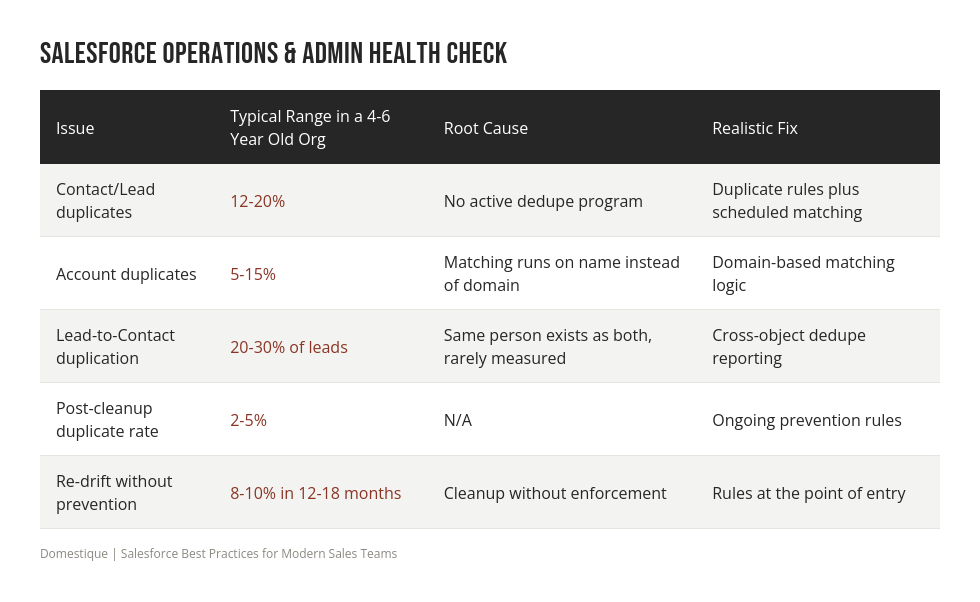
Most orgs we look into have never run an active dedupe program, and it shows. Contact and lead duplicates typically sit between 12 and 20 percent. Account duplicates run lower, 5 to 15 percent, but almost entirely because matching logic checks name instead of email domain, so "Acme Inc" and "Acme, Inc." become two separate accounts with two separate opportunity histories.
The one nobody measures is lead-to-contact duplication, where the same human exists as both a lead and a contact. That range runs 20 to 30 percent of leads, and it directly breaks attribution, since marketing touches attach to one record while sales activity attaches to another.
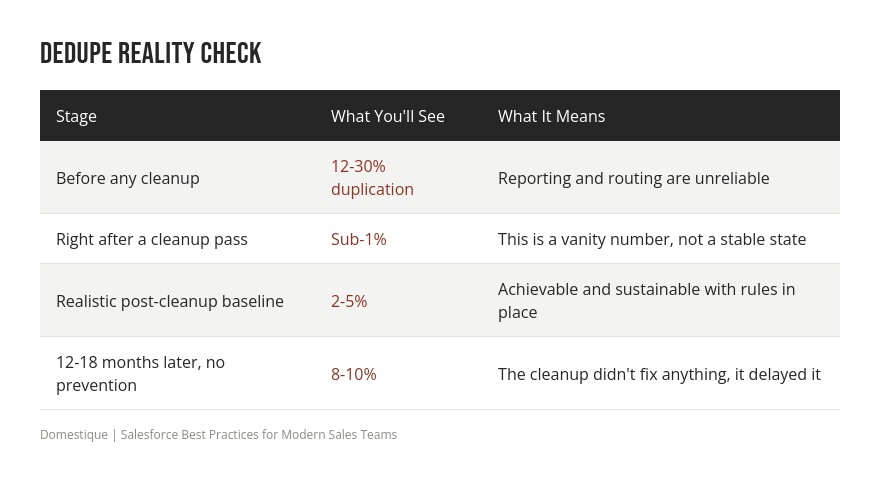
A dedupe pass without duplicate rules and domain-based matching is a haircut, not a fix.
Your Object Model Is Carrying Years of Dead Weight
Custom fields accumulate fast. A Salesforce org that's been live for four to six years typically has 300 to 800 custom fields spread across Lead, Contact, Account, and Opportunity, with Opportunity alone often carrying 80 to 150 on its own.
Here's the part that matters for anyone building reports: 20 to 30 percent of those fields sit at zero percent fill, and another chunk, 40 to 50 percent total, sit under 10 percent fill. Meanwhile, only 10 to 15 percent of fields actually drive reporting and forecasting in any meaningful way.
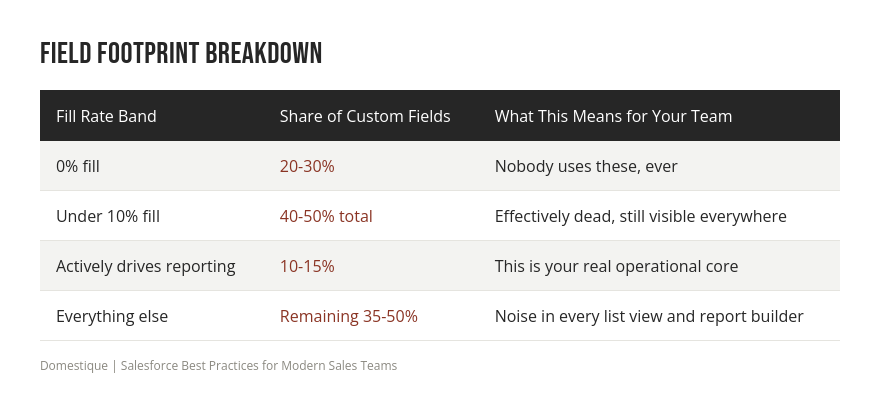
Roughly half your custom field footprint is dead weight, and it still shows up in every report builder dropdown your team scrolls through.
"Required" Fields Aren't Required, They're Suggestions
This is the one that surprises people. Of the fields stakeholders believe are required, 60 to 80 percent are only page-layout-required, which means they're enforced when a human fills out a form in the UI and skipped by everything else.
That "everything else" is most of how records get created now. API writes, data loader imports, Flow, quick actions, and mobile all bypass page-layout requirements entirely. So the field looks required to your rep and is completely optional to your marketing automation sync, your sequencer, your routing tool, and your CPQ.
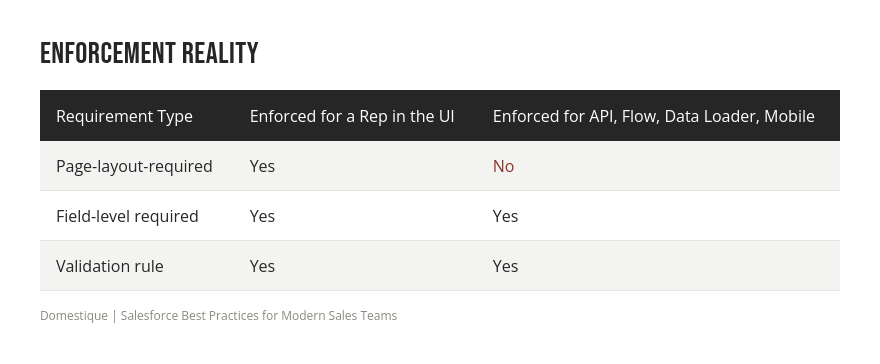
Only field-level required or a validation rule is actually enforced. If your data quality strategy leans on page-layout requirements, it's not a strategy, it's a suggestion box.
Building an Operating Rhythm That Holds
None of this is a one-time project. Duplicate rules, field-level requirements, and validation logic need an owner and a review cadence, or the org drifts back to where it started. The orgs that stay clean treat Salesforce administration as ongoing operational work, not a cleanup sprint that gets scheduled once a year, and industry research backs this up: sales teams without an active data quality program lose hundreds of hours a year to bad CRM data, which is the real cost of treating cleanup as a one-time event instead of a standing function.
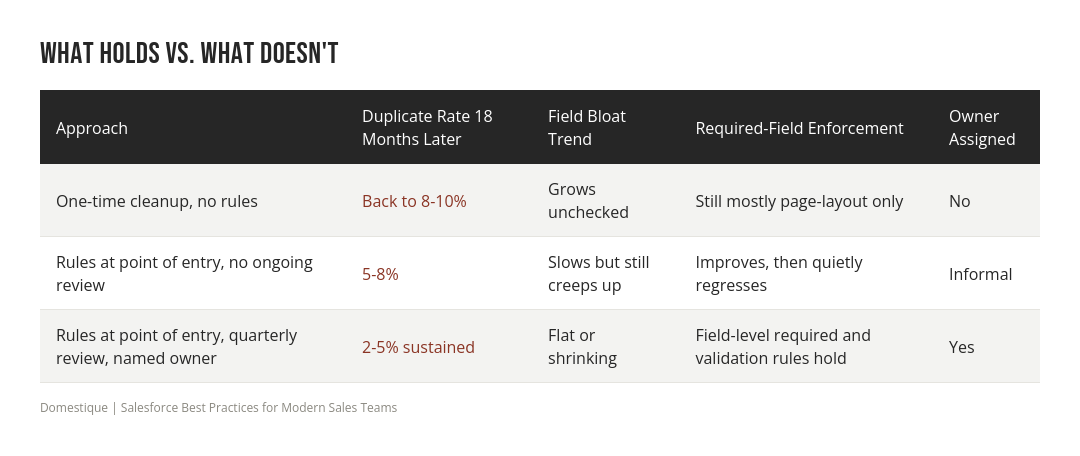
The pattern behind every stat in this article is the same. A cleanup fixes what already broke. An operating rhythm stops the next break before it happens, because it puts enforcement at the point of entry rather than in a dashboard someone checks quarterly. That distinction is what separates orgs that stay clean from orgs that need the same project again in eighteen months.
In practice, an operating rhythm has three parts. First, a named owner, someone whose job explicitly includes Salesforce data quality, not an admin who gets pulled onto it when a VP complains about a bad report. Second, enforcement that lives inside the object model itself: field-level required attributes and validation rules that apply no matter which system is writing the record, since a rule that only fires in the UI misses the API syncs, sequencers, and CPQ writes that create most records today. Third, a quarterly review that checks the same three numbers every time: duplicate rate by object, percentage of custom fields at or near zero fill, and the share of "required" fields that are still only page-layout-enforced. Reviewing the same three metrics on a fixed cadence is what turns a cleanup into a system, and it's a lighter lift than most teams expect once the first pass is done.
Frequently Asked Questions
Q: What is Salesforce Operations & Admin, and why does it matter for sales teams? A: It's the ongoing discipline of managing your Salesforce data model, records, and automation so the system stays accurate and usable. Without it, reps stop trusting the data and start working around the system instead of through it.
Q: How do I know if my Salesforce org has a duplicate problem? A: If you've never run duplicate rules with domain-based account matching, assume you're in the 12 to 20 percent range on contacts and leads. Most orgs are, and it's rarely visible until someone measures it.
Q: Will a one-time data cleanup fix our Salesforce data quality? A: Not on its own. A cleanup can get you to a sub-1% duplicate rate temporarily, but without prevention rules the org drifts back to 8 to 10 percent within 12 to 18 months.
Q: Why do "required" fields keep showing up empty in our reports? A: Most fields people assume are required are only page-layout-required, which the UI enforces but API writes, Flow, imports, and mobile do not. Only field-level required or a validation rule actually closes that gap.
Conclusion
The data model underneath your Salesforce org is either working for your sales team or working against them, and most orgs drift toward the latter simply because nobody owns the upkeep. Duplicate records, dead fields, and fake required fields all look like small issues individually, but together they erode trust in every report your team relies on. The fix isn't a bigger cleanup project, it's building enforcement into the system itself so the improvements actually hold.
If you want a clear read on where your own org stands, download the RevOps Maturity Checklist and see how your Salesforce operations measure up.
Sources
Domestique internal Salesforce org benchmark analysis, 2026, aggregated across client engagements.
Landbase. "Duplicate Record Rate Statistics: 32 Key Facts Every Data Professional Should Know in 2026." Landbase, 2026. https://www.landbase.com/blog/duplicate-record-rate-statistics